What you seeSomeone changed my email password, and Binance still uses that email
Your email was hacked and Binance still sends codes to it. Lock the account or get the email back first?
Can you still log in to Binance? If yes, disable the account there now and recover the email afterwards. If Binance already refuses you, flip it: start the email provider’s recovery at once, and contact Binance through the support entry on its official site to report that the linked email was taken. Both paths end in the same place. Once the mailbox is yours again, you check every setting the intruder could have touched, then return to Binance to change the password, replace the anti-phishing code and decide whether to keep that email at all.
Why start with Binance? The compromised inbox can receive account codes and alerts while you are recovering it. If you can complete Binance’s security checks, use its self-service disable option. Email recovery may require the provider to verify that the mailbox is yours.
Two questions sort out your first move:
- Binance works, email doesn’t: disable on Binance, then recover the email. This is the most urgent case.
- Both still work: disable on Binance, then change the email password straight away.
- Binance doesn’t work, email does: secure the email (password, settings below) and contact Binance support at the same time.
- Neither works: start email recovery and contact Binance support at the same time.
Step 1: If Binance still lets you in, disable the account
Binance’s How to Disable My Binance Account? recommends disabling an account when you notice suspicious activity. The Binance instructions and limits below were checked in October 2026. Follow the verification requests and restriction notices shown on your own account when you act.
In the app, go to Account Info, then Security. Scroll down and tap Manage Account, then Disable Account. Read the notes, tap Disable Account again and complete the security verification.
On the website, click the profile icon and choose Account. Pick Security in the side menu, scroll to Account Management, find Disable Account and click Disable. Read the notes, click Disable Account and verify.
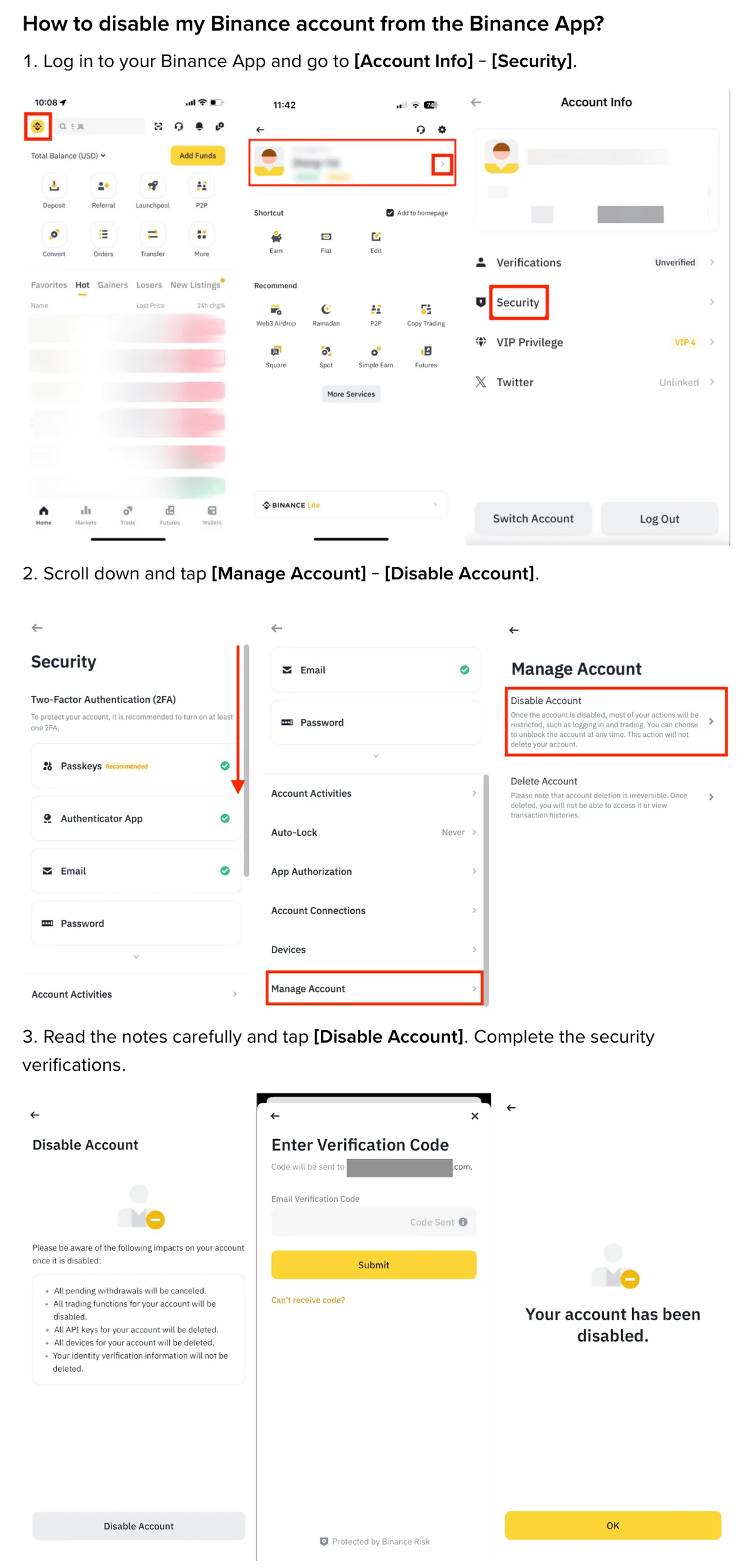
Which verification appears depends on what your account has switched on. If it asks for an email code and the inbox is no longer yours, this route is closed. Contact support instead and move on to Step 2.
Disabling is not closing. You can undo it. Binance’s How to Unlock My Binance Account? page describes the flow: log in, choose Unlock in the pop-up and pass the checks your account status calls for. Three outcomes are listed. Success means you log in as normal. A request under review gets its result by email. A failure means trying again or contacting support. After a successful unlock, allow up to 48 hours before withdrawals and P2P trading come back.
Note that review result arrives by email. Hold off on Unlock until you have the mailbox back and have finished Step 3.
B-01On screenBinance still logs in, but my email password has been changed
You are locked out of the inbox, and every message Binance sends now reaches the other person only. Move fast here.
Disable the Binance account while you still can, then go to Step 2. If the only verification on offer is an email code, contact support and run the email recovery in parallel.
B-02On screenBinance says my password is wrong
You didn’t change it, so assume someone else did.
On the Binance login page, after you enter your email or phone number, the password screen has a Forgot password? link. That is step 4 in Binance’s How to Reset 2FA When I Can’t Access My Binance Account?. The same page says that if you cannot reset the password because none of your 2FA devices work, you need to contact support. If the reset wants an email code, recover the mailbox first (Step 2). Otherwise the code goes straight to the intruder.
Step 2: Recover the hacked Gmail or Outlook account
Google and Microsoft each publish a page on taking back a compromised account, and Steps 2 and 3 follow them: Google Account Help, Secure a hacked or compromised Google Account, and Microsoft Support, How to recover a hacked or compromised Microsoft account. Both were read in October 2026. These are the email providers’ own instructions, not exchange rules.
Gmail: can’t sign in? Use account recovery
- Try to sign in. If you can’t, or someone changed your password or recovery phone, or deleted the account, Google sends you to the account recovery page. Answer its questions as fully as you can.
- Once in, open your Google Account, tap Security & sign-in, and on the Recent security events panel select Review security events. Activity you didn’t do: choose No, it wasn’t me and follow the steps. Your own activity: choose Yes.
- Tap Your devices, then Manage devices. For anything you don’t recognise, select Don’t recognize a device? and follow the prompts.
- Change the Google Account password. Google then lists other passwords to change, and two of its categories cover your exchange directly: sites where you sign in with this email address, and sites that contact you at it.
- Turn on 2-Step Verification if it isn’t already on. A stolen password alone then no longer opens the account.
Outlook and Hotmail: Microsoft’s three steps
Microsoft’s page starts with a sign-in helper. Enter your email address or phone number and it suggests self-help options, or a chance to talk to a support agent. Below it come three steps:
- Scan your computer for malware before you change the password. On Windows, open Windows Security, go to Virus & threat protection and choose Scan options, then Full scan, then Scan now. Any antivirus will do, the page says, but the full scan comes first. Malware still sitting on the machine could grab the new password as you type it.
- Sign in and change the password to a strong one. If you can’t sign in, reset it.
- Review your account settings. That part belongs to Step 3 below.
Any other provider
Find the account recovery entry on that provider’s official help pages.
B-03On screenI can't get the email back at all
Binance has a route that swaps your verification without the old inbox. After the password on the login page, the security verification screen shows Email; open it and click Security verification unavailable? to request a reset. Later in the flow you may be asked for a new email address. Binance says requests under review may take up to 24 hours, and after a reset, withdrawals, P2P selling, internal transfers and payment services stay off for up to 48 hours.
The clicks in order are in changing your Binance email when the old one is gone.
Step 3: A new email password isn’t enough. Check forwarding, filters and recovery details
A new password only changes the lock on the door. Anything the intruder set up while inside is still there. Google gives these settings a checklist of their own and asks you to correct anything you didn’t change yourself.
On the Google Account:
- Recovery phone, recovery email, alternate or contact address. Suspicious-activity alerts go to the recovery phone and email. If those now point at the intruder, the next warning reaches them, and so does the recovery route.
- 2-Step Verification and its methods. An extra method you never added lets them pass your 2-Step Verification as if it were theirs.
- Apps with access to your account. Remove any you don’t recognise.
Inside Gmail:
- Automatic forwarding. An unwanted rule can copy Binance codes and alerts to someone else. Gmail’s forwarding guide distinguishes forwarding new mail, excluding spam, from forwarding only messages that match a filter.
- Filters and labels. A filter can archive or delete mail from a given sender, so Binance’s alerts may never reach your inbox. Google says to remove labels, filters or forwarding you didn’t create.
- Mail delegation. People listed there can open your Gmail. Remove anyone you didn’t add.
- IMAP/POP access. If you didn’t enable it, another mail program may be downloading your messages.
- Blocked addresses. If Binance’s sending address is blocked, its messages go to Spam. Check that folder and remove any block you did not set. Google explains this in its blocked-sender guide.
- Automatic reply, the address on outgoing mail, scheduled emails, your name in Gmail. The rest of Google’s list. Check them too.
Then look through Sent and Trash. Google counts sent emails you didn’t write as a warning sign. Messages missing from the inbox and absent from Trash can be reported, and you may get them back. A deleted Binance login alert or withdrawal notice is evidence of what happened during those days, so it is worth the request.
For Outlook and Hotmail, Microsoft’s step 3 says it has already reset some of your account settings because someone else got in. What it asks you to review yourself is connected accounts, forwarding and automatic replies. Forwarding works the same way as in Gmail. A connected account you never added: remove it.
B-04On screenI got the email back and there is a forwarding rule I didn't create
Before you delete it, write down or screenshot the address it forwards to. Support and the police may ask for it.
Then assume the worst: while the rule existed, every code and notice Binance sent to this inbox was read by someone else. Go to Step 4 and start with Binance’s account activity. The rule is also a strong argument for changing the linked email.
Step 4: Back on Binance, review activity, change the password, replace the anti-phishing code
If you disabled the account, unlock it first as described in Step 1.
- Review account activity. In the app: Profile, Account Info, Security, Account Activities. On the website: Profile, Account, Security, Devices and Activities. A login or device you don’t recognise sends you back to Step 1. Disable again and contact support.
- Change the login password. It should not match your email password, or any password you have used on another site.
- Rethink your 2FA. Email is one of Binance’s four 2FA methods; the others are passkeys, an authenticator app and your phone number. With 2FA scenarios you can pick methods separately for Login, Assets, Account Settings and Security Management. The email has just been in someone else’s hands, so give Assets and Security Management a method that doesn’t depend on it. Open Account → Security → Advanced Security → 2FA Verification Strategy → Manage to check eligibility. Binance requires completed identity verification and an asset threshold; its guide uses both “at least 100 USDT” and “more than 100 USDT”. If your balance is exactly 100 USDT, check the requirement shown there before assuming you qualify.
- Replace the anti-phishing code. Binance’s What Is an Anti-Phishing Code and How to Set It up on Binance? explains that the code appears in genuine Binance emails. If you set one earlier, it was printed in the very emails the intruder read, and they can now fake a message carrying the right code. The same page says to update it as soon as possible if you suspect a leak. On the website, click Change next to Anti-Phishing Code, then Change Anti-Phishing Code, enter the new one, click Confirm and complete 2FA. The new code needs 6 to 8 characters, at least three of uppercase, lowercase, digits and underscores, and no special characters. No code yet? Set one now. How to use it on a suspicious message is covered in a Binance code you never requested.
Keep the recovered email, or link a new one?
Link a new one.
You can’t be sure how long the intruder was inside or which Binance emails they opened. The Step 3 checklist only covers settings you can see. And they now know this address belongs to an exchange account, which makes it a good target for phishing that copies Binance’s emails.
Binance’s How to Change My Binance Account Email? gives the cost. The English page lists a restriction of up to 24 hours on withdrawals, internal transfers and P2P transactions; its Chinese version still lists up to 48 hours. Both say the old address cannot be used to register again for 30 days. Read your account’s confirmation notice before changing it, and check that the restriction has ended before attempting a transfer. The clicks, and the verification asked for in step 5, are in how to change your Binance email.
Do the swap last. Password, 2FA methods and anti-phishing code come first. Set up 2-Step Verification on the new mailbox before you link it, ideally using an address you haven’t registered anywhere else.
If you keep the recovered email, finish the settings checks and enable 2-Step Verification first. A short list of unfamiliar sign-ins does not establish that the mailbox is secure. Change the anti-phishing code either way.
Coins already gone? What you can still do
Account activity shows a withdrawal you didn’t make? Contact the exchange that held the funds through the support entry in its official site or app. Keep screenshots of the account activity and withdrawal history, the email provider’s security events, and the address the forwarding rule pointed to, and take them with you when you report it to the police.
Then watch for strangers who offer to get the coins back. The US Federal Trade Commission’s Refund and Recovery Scams page says someone who contacts you out of the blue and wants a fee upfront is a scammer, and that government agencies and legitimate organisations will never ask for money to help you get a refund, or guarantee that you’ll get it back.
A few days later, check the forwarding rules and account activity again
In the mailbox, look at forwarding and signed-in devices once more. Nothing you removed should have come back, and no new device should be listed. On Binance, open Devices and Activities again; every entry should be yours. If anything unfamiliar has appeared, start again from Step 1.
Filed under these lines
T-5New phone or emailT-10ScamsT-8Account restrictions