What you seeNew phone, and the authenticator app shows no codes
Authenticator codes gone after switching phones: your ways back
Start with the old phone. If it still turns on and opens the authenticator app, nothing is lost: Google Authenticator can export the codes as a QR code on the old phone, and the new phone scans it. The sites that rely on those codes are not involved at all.
If the old phone is gone (lost, broken or reset to factory settings), two things can still save you: codes synced to a Google Account, or the setup key you kept when you first added a site. Without either, the codes cannot be recovered, and you go through the 2FA reset on every site where you used them. On Binance that reset comes with a review and a pause on withdrawals.
Which situation is yours?
| Your situation | What you still have | Route | Stated wait |
|---|---|---|---|
| Old phone still opens the app | The codes themselves | Export and import in Google Authenticator | No site process involved |
| Old phone still works, you want a fresh setup | A working authenticator for the 2FA step | Change the authenticator on the site (Binance: Security, Authenticator App) | Binance: withdrawals, internal transfers and P2P off for up to 48 hours |
| Old phone gone, codes were synced | A Google Account | Sign in to it in Authenticator on the new phone | No site process involved |
| Old phone gone, setup key saved | The 16-digit key or the QR code from setup | Enter the key in the new app | No site process involved |
| Nothing left | Your password and any other 2FA method | The site’s 2FA reset | Binance: up to 24 hours if Under Review, then up to 48 hours of restrictions; other sites: depends on the site |
Old phone still works: move the codes across
Google’s help page Get verification codes with Google Authenticator is the reference for every app step on this page. The exchange examples come from two Binance pages, How to Change My Google Authenticator on the Binance Website? and How to Reset 2FA When I Can’t Access My Binance Account?. All three were checked October 2026.
If the old app saves your codes to a Google Account, you may not need to export anything: Google says signing in to that account in Authenticator on a new device syncs the codes automatically. Sign in on the new phone first and see whether the list fills.
Export the codes as a QR code
For the manual transfer, Google lists three things: the old device with the codes, the latest version of Google Authenticator on that old device, and the new device.
- On the new phone, install Google Authenticator, tap Get Started and sign in to your Google Account.
- On the old phone, open Authenticator and tap Menu, then Transfer codes, then Export codes. You will be asked to unlock the device.
- Select the accounts you want to move and tap Next. With more than one account, the old phone may show more than one QR code.
- On the new phone, tap Menu, then Transfer codes, then Import codes, and scan each QR code from the old phone.
- Wait for the confirmation that your codes have been transferred.
Or set up a new authenticator on the exchange (Binance example)
This gives you a new key instead of a copy of the old one. Binance’s website steps:
- Log in, hover over the Profile icon and click Account.
- Go to Security and click Manage next to Authenticator App.
- Click the edit icon next to the Google Authenticator you want to change.
- Read the notes and click Continue.
- Complete 2FA.
- Scan the QR code with Google Authenticator on the new phone, or enter the 16-digit code by hand, and only then click Next.
- Enter the 6-digit code from the new phone and click Submit.
This route needs you to pass 2FA at step 5, for example with the old authenticator. Binance’s page states that withdrawals, internal transfers and P2P transactions are disabled for up to 48 hours after the change.
B-01On screenThe codes are on the new phone, but the site rejects them
Google’s list for a code that does not work: you entered it before it expired, it belongs to the right site and the right Google Account, and the phone’s time is synced and correct for your time zone. From version 7.0 the app uses the phone’s own time setting, so set the date and time to update automatically. If the code still fails, the full checklist is on the page about codes that do not arrive or are rejected. Keep the old phone untouched until this is solved.
If the old phone still powers on, do not file a reset
A reset costs more than a transfer. On Binance it can sit Under Review or come back as Application Denied, and a successful one is followed by up to 48 hours without withdrawals, P2P selling, internal transfers or payment services. An export from the old phone triggers none of that, because nothing in your exchange account changes. So if the old phone charges and the app opens, even with a cracked screen, do the transfer first.
Old phone lost, broken or wiped
Your codes were synced to a Google Account
Install Google Authenticator on the new phone and sign in with the Google Account the old app used. Google says the codes sync to the new device automatically. Sync needs Google Authenticator version 6.0 or above on Android and 4.0 or above on iOS, and Authenticator itself needs Android 6.0 or above.
B-02On screenI signed in on the new phone, and the list is still empty
Google’s page gives two reasons. You may have been signed out: tap the profile icon at the top right and confirm you are signed in. Or the codes may be saved under a different Google Account: switch accounts from the same menu. If no account shows the codes, treat them as not synced and go to the setup-key section or the reset.
The phone was lost or stolen: take the codes off it
Google’s advice is to stop anyone else from reading the codes on the missing phone: use the remote erase option for iOS or Android. If that is not available, remove the old device from your Google Account (synced codes), or remove the codes on every site that uses them and link the new device (codes not synced).
You kept the setup key
When you add an authenticator on Binance, the page shows a QR code and a 16-digit code to scan or type into the app. If you saved that code, or a screenshot of the QR code, entering it in Google Authenticator on the new phone repeats the step that created the entry. Google’s help page does not describe restoring from a saved key. A key saved before a later authenticator change on the same site belongs to the old setup and will not match.
Nothing left: the site’s own 2FA reset
Reset flows differ from site to site, so look up the flow on every site where you used the codes. On Binance it starts from the login screen:
- Click Log In, enter your email or phone number and click Next.
- If a passkey window appears, click Cancel, then My Passkeys Are Not Available.
- Enter your password and click Next. If you forgot it, click Forgot password?. If you cannot reset the password because no 2FA is available, Binance’s page says to contact Customer Support.
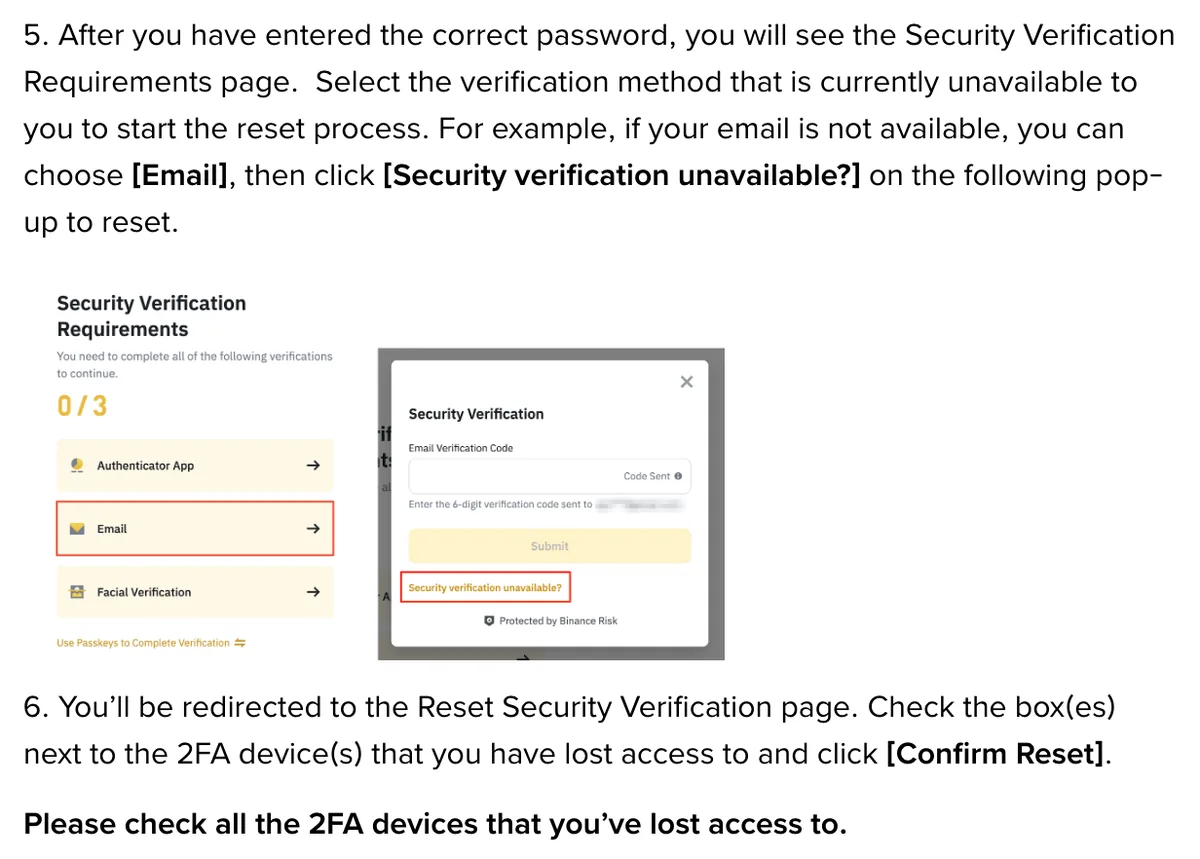
- On the Security Verification Requirements page, select the method you no longer have, then click Security verification unavailable? in the pop-up.
- On the Reset Security Verification page, tick every 2FA device you have lost and click Confirm Reset. Read the pop-up and click Confirm.
- Complete verification with the methods you still have.
- If asked, enter a new phone number or email address, click Get Code to verify, then click Submit.
If the reset succeeds, you log in with the new 2FA device. Binance’s page asks you to allow up to 48 hours before withdrawals, P2P transactions or internal transfers work again. If you see Application Denied, the page says to double-check which 2FA devices you still have and try again.
An Unlock prompt at login instead of a code request means the account is disabled, and that has a separate route: see account locked, disabled or withdrawals suspended. Changing the email or phone number again later is covered in changing the email or phone number.
B-03On screenMy reset request says Under Review
A dedicated team is reviewing it; Binance’s page says this may take up to 24 hours, with the result sent to the new verified email address. You can also check through the Security verification unavailable? link. There is nothing more to submit while you wait.
Before your next phone change
- Sync your codes to a Google Account in Authenticator, which Google lists first among its best practices. If you prefer to use the app without an account, do the export before the old phone is reset.
- Add a second sign-in method on every site that uses the authenticator. A passkey kept on another device gives you a way in that does not depend on the authenticator app.
- Keep the old phone as it is until every code works on the new one.
Once your codes work again
Before you touch the old phone, sign in to each site with a code from the new phone and confirm it is accepted. Only then clear the old phone. If your codes are synced, remove the old device from your Google Account rather than deleting entries from it: Google’s page says a deleted synced code disappears from every device it is synced to, including the new one.
Questions people ask
Can I move Google Authenticator to a new phone if the old one still works?
Yes. On the old phone, open Google Authenticator, tap Menu, then Transfer codes and Export codes, select the accounts and tap Next to get a QR code. On the new phone, tap Menu, Transfer codes, Import codes and scan it. Google's help page lists the latest app version on the old phone as a requirement. Nothing changes on the sites that use the codes.
I lost my phone. Can I get my authenticator codes back?
Only if the codes were synced to a Google Account or you kept the setup key. Google's help page says that when you sign in to your Google Account in Authenticator on a new device, the codes sync to it automatically. Sync needs version 6.0 or above on Android and 4.0 or above on iOS. If the app was used without an account, the codes were stored on the lost phone only.
How long does a 2FA reset take on Binance?
Binance's reset page says a request marked Under Review may take up to 24 hours, and the result is sent to the new verified email address. After a successful reset, withdrawals, P2P selling, internal transfers and payment services are disabled for up to 48 hours. Other sites set their own times.
Should I delete the codes from my old phone after moving them?
Not until every code works on the new phone. Google's help page says that deleting a synced code removes it from all devices where your codes are synced. If you use sync, remove the old device from your Google Account instead of deleting the codes one by one.
Filed under these lines
T-4Authenticator and passkeysT-5New phone or email