What you seePressed Get Code and nothing came, or the code fails
No Binance code? Find out which channel failed, then fix that one
Start with the channel, because each one fails for a different reason. A text message depends on your country being on Binance’s SMS list and on your phone letting the message through. An email depends on your inbox. An authenticator code is not sent at all: the app makes it on your phone, so when Binance rejects it, check the phone’s clock first.
Find your row in the table and go to that section. If the phone number or the authenticator app itself is gone, more waiting will not help. That is a reset, and those cases are near the end of this page.
| The code you need | Where it comes from | What can stop a working code |
|---|---|---|
| SMS code | A text to the phone number on your account | Your country on Binance’s SMS list, phone signal, apps that block messages |
| Email code | A message to the email address on your account | The address itself, spam filters, inbox rules, free space in the mailbox |
| Authenticator code | Made on your phone by the app; it works without internet or mobile service | The time setting on the phone, the right entry, entering it before it expires |
Binance SMS code not coming: the coverage list, then five checks
Binance’s help page on missing SMS codes splits readers into two groups before it gives a single step. Do the same.
Is your country on Binance’s SMS list?
The page says Binance does not support SMS authentication in some countries and regions, and sends you to a separate page, “Supported Countries for SMS Verification on Binance”. The list gives the countries with their dialling codes. Find yours, and check that the dialling code matches the one in front of the number saved on your account.
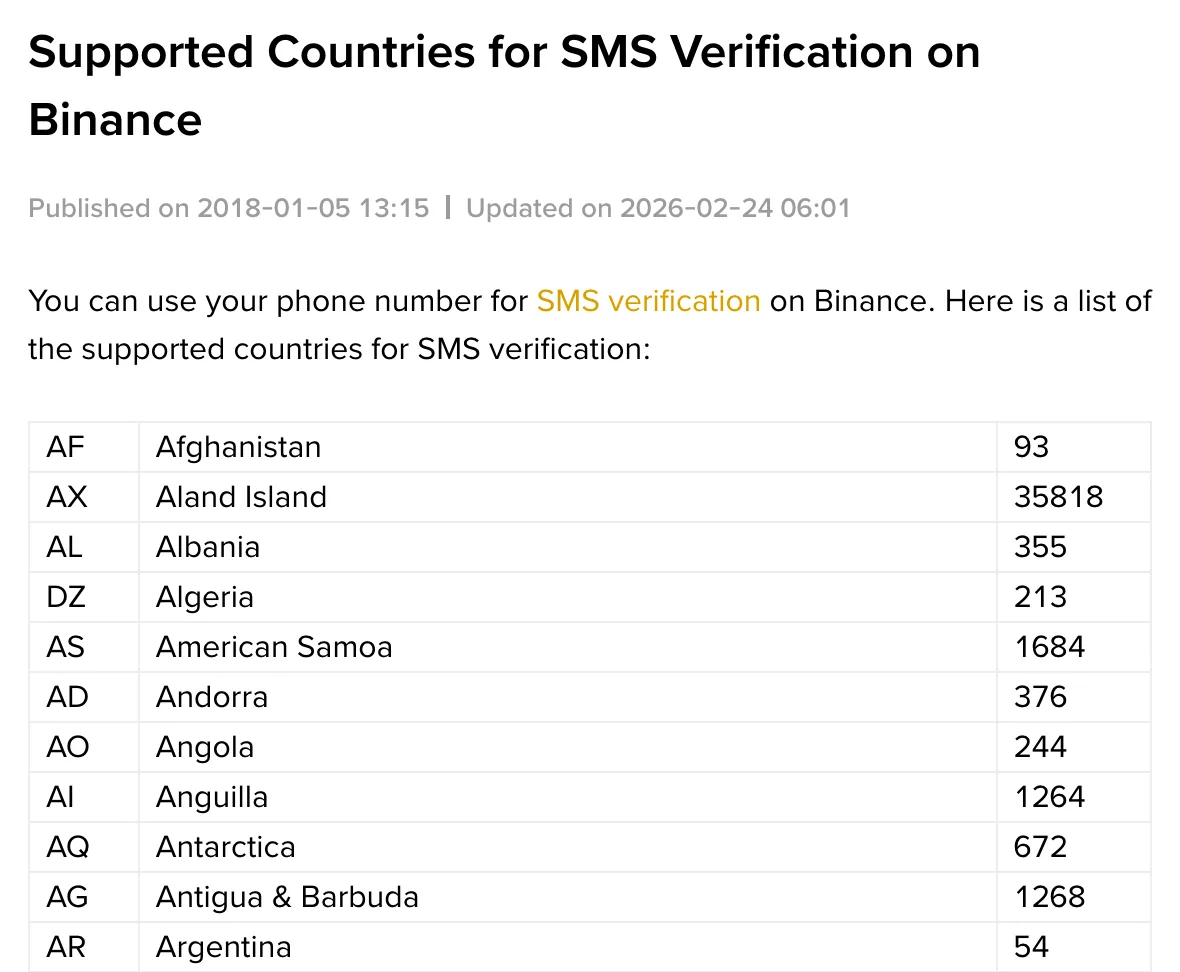
B-01On screenMy country is not on the SMS list
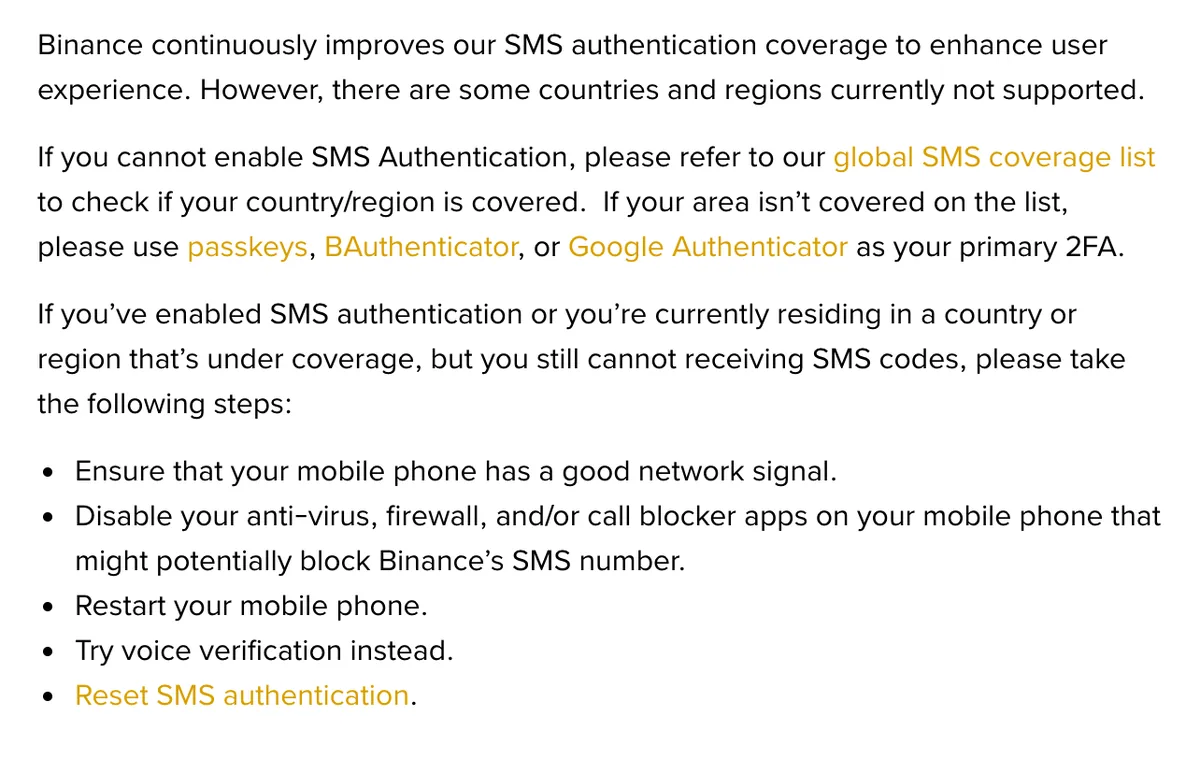
Binance does not support SMS authentication there, so waiting will not fix it. Binance’s page says that if your area is not covered, you should use passkeys, BAuthenticator or Google Authenticator as your primary 2FA. If you are still signing up, register with an email address instead of the phone number. If an SMS step already blocks you from logging in, you need the reset described in the authenticator section below.
Your country is covered, but the text still does not arrive
For people who have SMS authentication on, or who live in a covered country, Binance lists these steps in this order:
- Make sure the phone has a good network signal.
- Turn off anti-virus, firewall or call-blocker apps on the phone that might block Binance’s SMS number. Turn them back on once you have the code.
- Restart the phone.
- Try voice verification instead. The page names this option but does not describe the button. If the code screen offers a call instead of a text, that is the one.
- Reset SMS authentication, which means replacing the phone number on the account.
B-02On screenI did all five steps and still no text
Stop requesting new codes. Another request does not change anything the five steps check. Step 5 is what is left: replace the number. Binance’s page on resetting the SMS phone number says you must complete 2FA to do it, and that withdrawals, internal transfers and P2P transactions are disabled for up to 48 hours afterwards. The full route is on the fixbook page about changing the email or phone number on the account. If SMS is your only 2FA method and you cannot pass it, use the reset route in the authenticator section instead.
Binance’s wording for this section is on two pages, Why Can’t I Receive SMS Verification Codes? and Supported Countries for SMS Verification on Binance; both were checked October 2026.
Binance email verification code not received
This fixbook has no Binance page to quote on missing email codes. The checks below are general inbox troubleshooting, not steps published by Binance.
- Other folders. Look in spam, junk, and any promotions or updates tab, then search the whole mailbox for “Binance”. If you find the message there, mark it as not spam.
- The address. Check the address you typed on the code screen, letter by letter. One wrong character sends the code to someone else’s inbox, or nowhere.
- Rules and forwarding. Filters you set up long ago can move mail into a folder you never open, or forward it to another address.
- A full mailbox. A mailbox with no free space can refuse new messages. Delete or archive something, then request a new code.
Is that email really from Binance? Check the anti-phishing code
Once you find an email that says it is from Binance, check it before you type its code anywhere or click anything in it. Binance’s anti-phishing code is a short code you choose yourself, and genuine Binance emails carry it once it is set; how far the check goes for text messages is covered on the unrequested-code page linked at the end.
To create one on the website, open Account from the Profile menu, go to Security, scroll to Advanced Security and click Enable next to “Anti-Phishing Code”. Then click Create, enter your code, click Submit and complete 2FA. In the app, go to Account Info, then Security, then Anti-Phishing Code, then Create. The code must be 6 to 8 characters long and include at least three of these four types: uppercase letters, lowercase letters, digits and underscores. Special characters are not allowed.
Set the code before you need it. An email that arrives before you have one gives you nothing to compare against.
B-03On screenAn email says it is from Binance, but my anti-phishing code is missing or wrong
Do not use the code in it and do not click its links. Binance’s anti-phishing setup page treats this as a possible phishing attempt to report. Open the Binance site by typing the address yourself and request a fresh code there. If you never asked for a code in the first place, see the last section of this page.
Binance authenticator code invalid or rejected
Google’s help page Get verification codes with Google Authenticator has a short list for codes that do not work. Check each point:
- You entered the code before it expired. Wait for the next one and type it straight away.
- You used the code for the right service. Several entries can sit in the app, so read the name above the code.
- You used the code for the right Google Account, if the app holds codes for more than one.
- The time on your phone is synced and correct for your local time zone.
The fourth point matters more than it used to. Google says the time correction setting is no longer in the app from version 7.0, and that the app now uses the time setting of your phone’s operating system. Set the phone’s date and time to update automatically, check the time zone, then try a fresh code.
B-04On screenThe Binance entry is gone from the authenticator app
First check two things from Google’s page. You may have been signed out of your Google Account in the app (check the profile icon at the top right), or the codes may be saved under another Google Account. If the entry was lost with an old phone or a deleted app, Binance has a reset route. On the login page, after your password, choose the method you cannot use on the security verification page and click Security verification unavailable?. Binance’s reset page says a request Under Review may take up to 24 hours to process, and that withdrawals, P2P selling, internal transfers and payment services are disabled for up to 48 hours after a reset. The whole route is on the fixbook page about a new phone and lost authenticator codes.
Phone number no longer in use
A text cannot reach a SIM card you no longer have, so none of the checks above apply. Replace the number on the account instead. The steps, and what to do if you cannot pass 2FA to start them, are on the page about changing the email or phone number.
Workarounds that put the account at risk
Two shortcuts can look like a quick way to get a code. Both create a bigger problem than the missing code.
- A disposable email address. Clause 26 of the Binance Terms of Use prohibits using a temporary, disposable, self-destructing or similar email address to open an account or use Binance services. Clause 20.1 lists an email to your address that bounces as undeliverable among the reasons Binance may suspend or restrict access. Every later code would also go to an inbox that may stop existing.
- A borrowed or rented phone number. Your login codes would go to whoever holds that number. Clause 9.2 of the Terms says no one but you may use an account registered in your name, and clause 20.1 lets Binance restrict an account when it suspects someone other than you is logging in.
The Terms quoted here are paraphrased from the version on Binance’s site. Read the live Terms before relying on any clause.
A code arrived that you did not ask for
That is a different problem from a code that never comes. Do not enter the code anywhere and do not give it to anyone. What it means, and what to check, is on the page about a verification code you did not request.
Filed under these lines
T-2Verification codesT-4Authenticator and passkeys