What you seeBinance says the account is frozen, locked or disabled
Binance account frozen, locked or withdrawals suspended: which one is it?
Binance uses several different restrictions, and people call all of them “frozen”. They are not the same thing. The help page, the way back and the waiting time differ from one restriction to the next, so the steps for one do not work for another.
Start with the exact words in front of you: the SMS or email you received, the pop-up after login, or the error on the withdrawal screen. The table below pairs each of those with a restriction, and the sections after it follow the same order.
Match the message to the restriction
| What you see | Binance page | Who triggered it | Where to recover | Restricted afterwards |
|---|---|---|---|---|
| SMS or email saying the account is frozen for risk control | My account was frozen due to risk control (Chinese) | Binance’s risk control | The process given in that SMS or email; Customer Support with documents | Not stated on the page |
| A pop-up with Unlock when you log in | How to Unlock My Binance Account? | The account is in disabled status | The Unlock pop-up itself | Withdrawals and P2P for up to 48 hours |
| Same pop-up, after you pressed Disable Account yourself | How to Disable My Binance Account | You | The same Unlock pop-up | As the row above |
| Login works, withdrawals fail with a message | How to Reactivate the Withdrawal Function, plus the change and reset pages | A security change you made, or a risk check | Wait out the stated period, or verify and appeal | Lifts when the period ends or the review passes |
| Only withdrawing, cancelling orders, closing positions and redeeming work | The identity verification and Update Identity pages | Unfinished or updating identity verification | Complete Verified, or finish Update Identity | Withdraw Only until verification is done |
Three Binance pages carry most of this article: My account was frozen due to risk control: what should I do? (the title translated here; the page is available in Chinese), How to Unlock My Binance Account? and How to Reactivate the Withdrawal Function for My Binance Account?. Each was checked October 2026; the other pages are named by title where they are used.
Frozen for risk control: what triggers it and how to get it reviewed
The risk-control page describes the lock as an extra technical measure: when an account shows suspicious logins or abnormal activity, it is locked to protect the funds in it. It lists the situations that can set it off:
- your IP address is in a country or region where Binance does not support trading;
- you have often logged in to several accounts from one device;
- the country or region of your identity verification does not match the places where you are active day to day;
- accounts were registered in bulk to take part in Binance promotions;
- the account is suspected of a violation and frozen at the request of a judicial authority;
- frequent large trades or withdrawals in a short time;
- activity from a suspicious device or IP address, with a risk that the account was stolen;
- other risk-control reasons.
If the freeze came from a mistake on your side, the page says to follow the SMS or email prompt and complete the self-service unlock through the process that support or the risk team specifies. Binance then reviews it within 3 to 7 working days. The same page asks you to change your password and make sure only you can access your email, phone, Google Authenticator and Binance Authenticator. You can also contact support, but the page warns that unlocking a risk-control freeze needs sufficient supporting documents that prove the account is yours; without them, or with documents that do not meet the requirements, you will not get timely help.
The Binance Terms of Use (clause 20.5) add that residents of some countries can access only part of Binance’s services, that travelling to a country on the prohibited list means you cannot use the services there, and that you must not try to get around these restrictions in any way, including by using a VPN to change your IP address. There is no workaround to describe here.
B-01On screenI submitted the documents and several days have passed without an answer
The stated review time is 3 to 7 working days, so weekends and public holidays do not count. Until that time is up, there is nothing to add. If it has passed, type the Binance address yourself, contact support there, and give your UID and the date you submitted.
An Unlock window appears when you log in
This is a disabled account. The unlock page has three steps:
- Log in. A pop-up appears; select Unlock.
- Complete the security verifications. The page notes that the steps differ depending on the account’s status.
- Read the notification. If the unlock succeeded, you can log in and use the account. If the request is under review, the result will be sent by email. If it failed, try again or contact Customer Support.
After a successful unlock, Binance asks you to allow up to 48 hours before you can withdraw funds or use P2P.
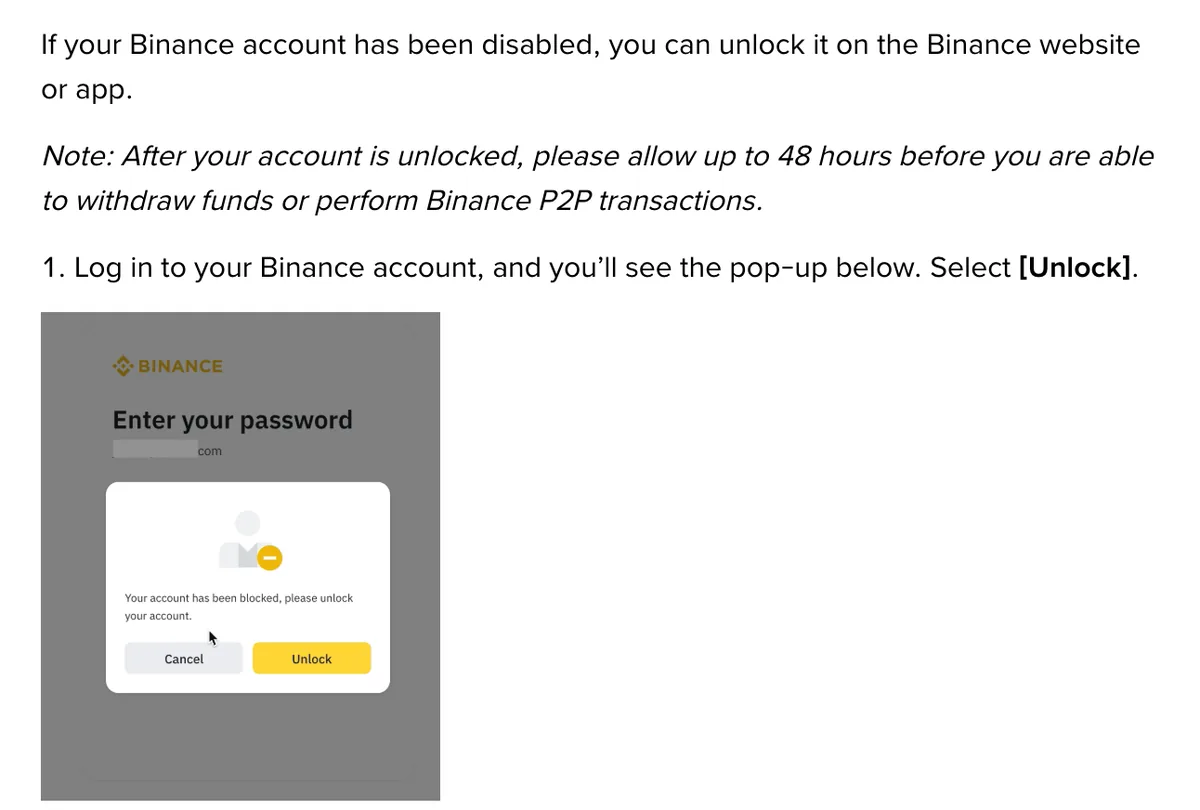
The same route applies if you disabled the account yourself. On the Binance page about disabling, that action sits in the app under Account Info, Security, Manage Account, Disable Account, and on the website under Security, Account Management, Disable; the page sends anyone who wants to reverse it to the unlock page. If a verification step fails because the phone with your authenticator is gone, see a new phone and lost authenticator codes before trying again.
B-02On screenThe notification says my unlock request is under review
You are done for now. The page says the result comes by email. Check that mail from Binance is not being filtered, and do not start a new request in the meantime.
You can log in, but withdrawals are suspended
First think back over the last two days. Many security changes pause withdrawals on purpose, and the Binance pages give separate figures:
- Password change and similar security operations: withdrawals suspended for 24 to 48 hours, reactivated automatically; the withdrawal reactivation page says this cannot be lifted early.
- Email change: withdrawals, internal transfers and P2P transactions disabled for up to 48 hours (How to Change My Binance Account Email?).
- Phone number change: the same three functions disabled for up to 48 hours (How to Reset My Phone Number for SMS Verification on the Binance Website?).
- Authenticator change: the same three functions disabled for up to 48 hours (How to Change My Google Authenticator on the Binance Website?).
- 2FA reset from the login page: withdrawals, P2P selling, internal transfers and payment services disabled for up to 48 hours (How to Reset 2FA When I Can’t Access My Binance Account?).
These are separate statements on separate pages; this fixbook does not combine them into one figure. If you are about to change your email or phone, the steps are on changing the email or phone number.
If you changed nothing, the system may have flagged activity. The reactivation page lists three messages. “Your withdrawal may be at risk. You can try again in 24 hours.” means the withdrawal is under review; wait for the emails. “…try again in 48 hours.” is a security measure that cannot be lifted. “Your withdrawal function may be suspended due to risk of fraudulent activity.” can bring an anti-scam questionnaire, warning messages to acknowledge and cool-down periods.
Some restrictions are imposed by Binance directly. The page says the user is normally told by email, SMS or in-app notification, and a pop-up at the next login explains the reasons. To ask about it or appeal, contact Customer Service; not all restrictions can be appealed, in particular where law enforcement orders or regulatory obligations are involved.
B-03On screenIdentity verification failed, and the withdrawal alert offers an appeal
On the website, open the Withdraw Crypto page and click Withdraw appeal on the alert, then submit the documents asked for. In the app, go to Wallets, Spot, Withdraw and tap Appeal in the pop-up. If you see no Appeal button, the page says to contact Binance Support. If it was the face check that failed, the appeal leads to a Facial Verification Appeal page: you may have to answer security questions carefully, then provide the materials shown, with anything useful under Additional Information. The result comes by SMS or email. Camera and lighting problems behind a failing face check are covered in face verification keeps failing.
Only withdrawals, cancellations and closing positions still work
That is Withdraw Only mode, and it has two causes on Binance’s identity pages. The page How to Complete Identity Verification for a Personal Account? says existing users who have not completed Verified have their permissions changed to “Withdraw Only”, limited to fund withdrawal, order cancellation, position close and redemption. The fix is to finish verification from Account, Identification, Get Verified.
The page How to Update My Verified Identity Information? describes the second cause: once you declare that you are updating your identity documents, the account is restricted to “Withdrawal Only” until all the new information is submitted and verified. You receive an email when the system review is complete.
Someone offers to unfreeze the account for you
Do not answer. Binance’s page How to Identify Fake Binance Support Phone Numbers? says its support is available only on the official Binance website, and that anyone calling and claiming to be from Binance is a scammer. Binance does not contact users through unofficial channels to offer a “backdoor” to unlock an account, and it does not ask anyone to send coins to an address. Open the website yourself if you need help.
When to stop and wait for Binance’s email
Stop acting once you have done the one thing your state asks for. That means the self-service process after a risk-control freeze (then 3 to 7 working days), an unlock request marked under review, a withdrawal message saying 24 hours with a review in progress, or a 2FA reset showing Under Review. From that point the outcome arrives by email or SMS, so all that is left is to make sure Binance’s emails are not filtered, and to leave the account alone until the message comes.
Questions people ask
How long does Binance take to review a risk-control freeze?
Binance's Chinese-language risk-control page says that after you follow the self-service process given in the SMS or email, the review takes 3 to 7 working days. The unlock page for the Unlock prompt at login gives no number of days; it says a request under review is answered by email.
My Binance account is unlocked. Why can I still not withdraw?
Binance's unlock page asks you to allow up to 48 hours after unlocking before you can withdraw funds or use P2P. If you also changed your email, phone number or authenticator, or reset 2FA, those pages also state a pause of up to 48 hours.
Will Binance tell me why my account was restricted?
Binance's withdrawal reactivation page says that when it restricts an account, it normally informs the user by email, SMS or in-app notification, and a pop-up at the next login gives more detail on the reasons. Appeals go to Customer Service, but the page says not all restrictions are open for appeal, especially those involving law enforcement orders or regulatory obligations.
The withdrawal message says try again in 48 hours. Can it be lifted sooner?
No. For the message that your withdrawal may be at risk and you can try again in 48 hours, Binance's page says the suspension cannot be lifted and asks you to wait. The 24 to 48 hour pause after a security change such as a new password also cannot be ended early; withdrawals reactivate automatically when it ends.
Filed under these lines
T-8Account restrictionsT-10Scams