What you seeFirst Binance account, unsure what each screen wants
Opening a Binance account, one screen at a time
By the end of this page you will have a Binance account created on the website or in the app, identity verification submitted, and a second sign-in method added. Three choices on the way cannot be undone later: personal or entity account, the referral code linked to it, and the personal details you confirm at the end of identity verification. Each is marked where it happens.
Arrived with a specific problem? Missing or expired codes are handled right after the five website steps. A referral field without the green tick, or a forgotten code, is in the referral section. A failing face check, a wrong confirmed detail or a slow review are under identity verification.
Who can register, and what to have ready
Clause 2.1 (Eligibility) of the Binance Terms of Use sets the conditions. This is a paraphrase, so read the live Terms before you register. As an individual you must be at least 18; have no existing Binance account; not have been suspended or removed from Binance services; not be a restricted person (people on government sanctions lists, or based in a prohibited country); and not be located in or a resident of a prohibited country or a place where using Binance breaks the law.
Clause 20.5 says you must not try to get around geographic restrictions, including by using a virtual private network to change your IP address. Clause 26 prohibits opening an account with a temporary, disposable, self-destructing or similar email address.
| Have ready | Used for | Check first |
|---|---|---|
| An email you will keep, or a phone that receives SMS | The 6-digit code at sign-up | For a phone, that your country is on Binance’s SMS coverage list |
| A valid government-issued ID | Identity verification | Most users can choose passport, ID card or driver’s license, depending on the issuing country |
| A device with a camera | The face check | Camera access allowed for the browser or app |
| The phone you will keep | Adding a passkey later | Binance app 2.60 or above, on iOS 16 or Android 9 or above |
Registering on the Binance website, step by step
The steps and button labels from here on come from Binance’s Help Center pages How to Register on the Binance Website, How to Complete Identity Verification for a Personal Account and Frequently Asked Questions on Binance Referral Pro Mode, checked October 2026.
The email or phone route for a personal account:
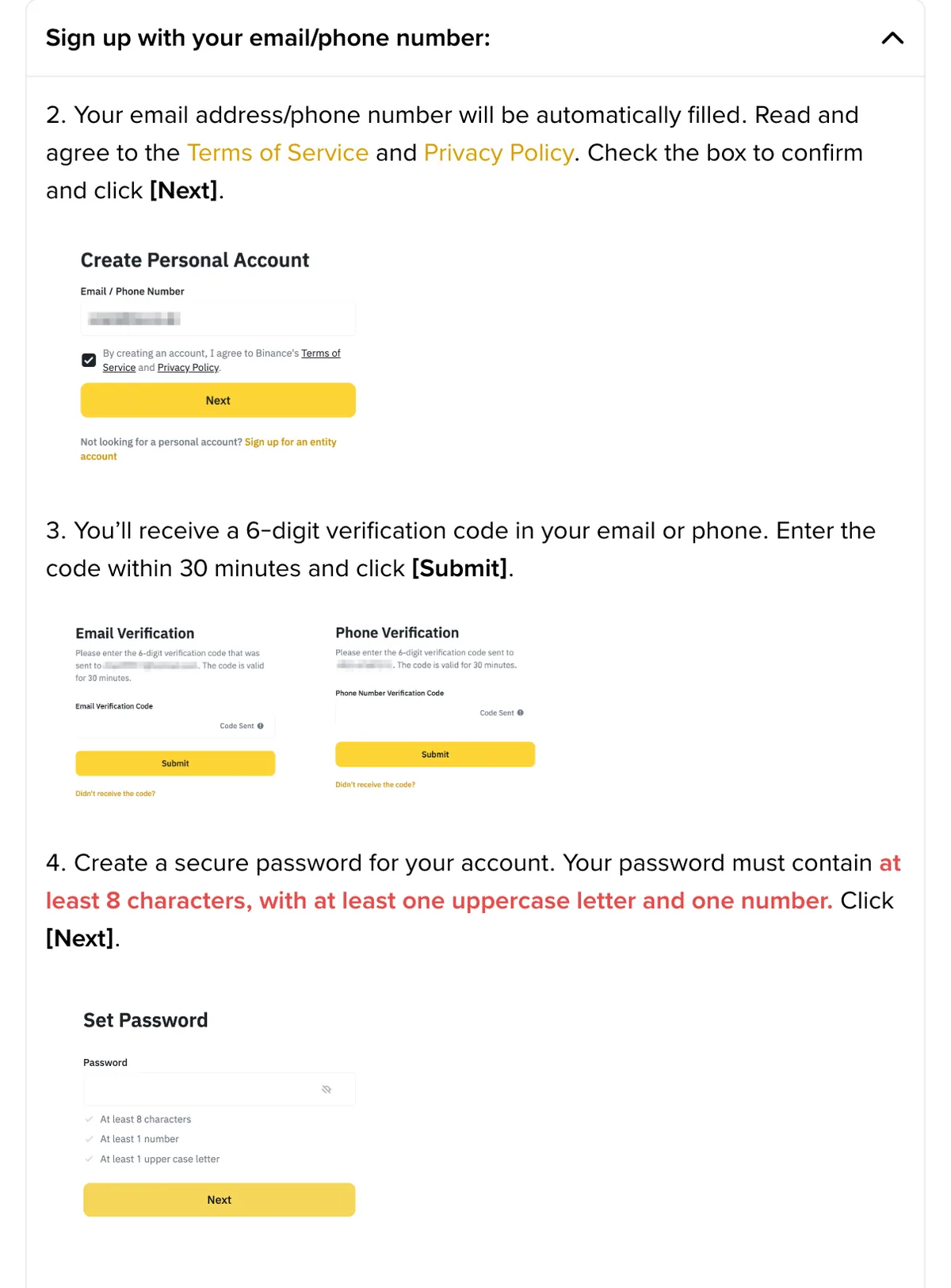
- Type your email address or phone number into the box on the homepage and click Sign Up. For Apple or Google, click the icons below the box. Decide now between a personal and an entity account: “Once registered, you cannot change the account type.”
- Check the email or number filled in for you, tick the box to agree to the Terms of Service and Privacy Policy, and click Next. A typo here sends the code somewhere you cannot read it.
- Enter the 6-digit verification code from your inbox or SMS and click Submit. The page says to do this within 30 minutes.
- Create a password and click Next. At least 8 characters, with at least one uppercase letter and one number.
- The page says the account was created. Do not click Next yet. This screen holds the referral field; check it as described in the referral section, then click Next. Binance notes you must complete identity verification before trading.
B-01On screenI clicked Submit but the code did not arrive
For an SMS, Binance’s page on missing SMS codes says to check its SMS coverage list first; if your country is not listed, use email at step 1. If it is listed, Binance’s checks are: good signal; anti-virus, firewall or call-blocker apps off; phone restarted; voice verification instead.
For an email, Binance gives no checklist. General advice: look in spam, junk and promotions folders, and go back one step to check the address for typos.
More cases are on the fixbook page about codes that do not arrive. Do not switch to a throwaway inbox: clause 26 prohibits it, and you need this address to recover the account later.
B-02On screenI found the code, but it is more than 30 minutes old
Binance’s page says to enter the code within 30 minutes. Stop trying the old code. Run the step again for a fresh code and enter only the newest one. If the page has expired, start from the homepage: by Binance’s steps, the account exists only after the password and success screen.
Apple, Google or Telegram instead of email
With Apple or Google, choose Continue with Apple or Continue with Google, sign in to that account in the pop-up, agree to the Terms of Service and Privacy Policy and click Confirm. Back on the Binance website, confirm again and click Next. The same referral field then appears. This route has no code and no password, so the Apple or Google account becomes a way into Binance; turn on its own two-step sign-in first.
Telegram takes eight steps:
- On the sign-up page, click Continue with Telegram.
- In the pop-up, click Connect.
- Log in to Telegram.
- Click Confirm on the notification Telegram receives.
- Click Create a new Binance Account. If you already have an account, choose Link an existing Binance Account instead (that skips the rest); a second account conflicts with the Terms.
- Enter your email or phone number, agree to the T&C, click Next.
- Enter the one-time code sent to you, click Next.
- The account is created. The page says you can bind your referral code at this step if applicable.
Personal or entity account
Both registration pages carry the same note: “Please select the type of account carefully. Once registered, you cannot change the account type.” The steps above create a personal account. For an entity account, enter your entity email on the homepage, click Sign Up, then Sign up for an entity account; enter the entity name, the entity email, the 6-digit code and a password. The last screen has the same referral field, and Next leads to entity verification.
B-03On screenI picked the wrong account type and only noticed afterwards
There is no switch. Wanted entity, got personal: Binance’s verification page says a verified personal account holder can create a separate entity account, so keep both.
Wanted personal, got entity: do not register again with the same details; ask Binance Support through the Binance website or app first.
What changes when you register in the Binance app
In the app, the email, phone and Telegram steps match the website. Binance’s page How to Register on the Binance App shows these differences:
| Part of the flow | Website | App |
|---|---|---|
| Start | Homepage box, then Sign Up | Sign up (shown for Lite and Pro mode), then Create a Binance Account, then a method |
| Entity account | Sign up for an entity account | Sign up as an entity |
| Apple or Google | Sign in, Confirm, then Next | Sign in, choose the account to sign up with, tick the box, Next |
| No referral code | Invalid codes can be edited or replaced | “If you have no referral code, you can skip this step”; Apple or Google shows Skip |
| After the last Next | Registration done; verification opened separately | Straight into identity verification |
Watch the Skip button. Skipping is not final, but adding a code later has far more conditions than this field.
The referral field: look for the green tick before Next
Binance’s registration page says: through a referral link, the code should fill in automatically with a green tick and Linked next to it; an invalid code can be edited or replaced; and “once a referral code is linked to your account, it cannot be modified.” The Referral Pro FAQ adds: “once the referral relationship has been established, it cannot be changed or removed.”
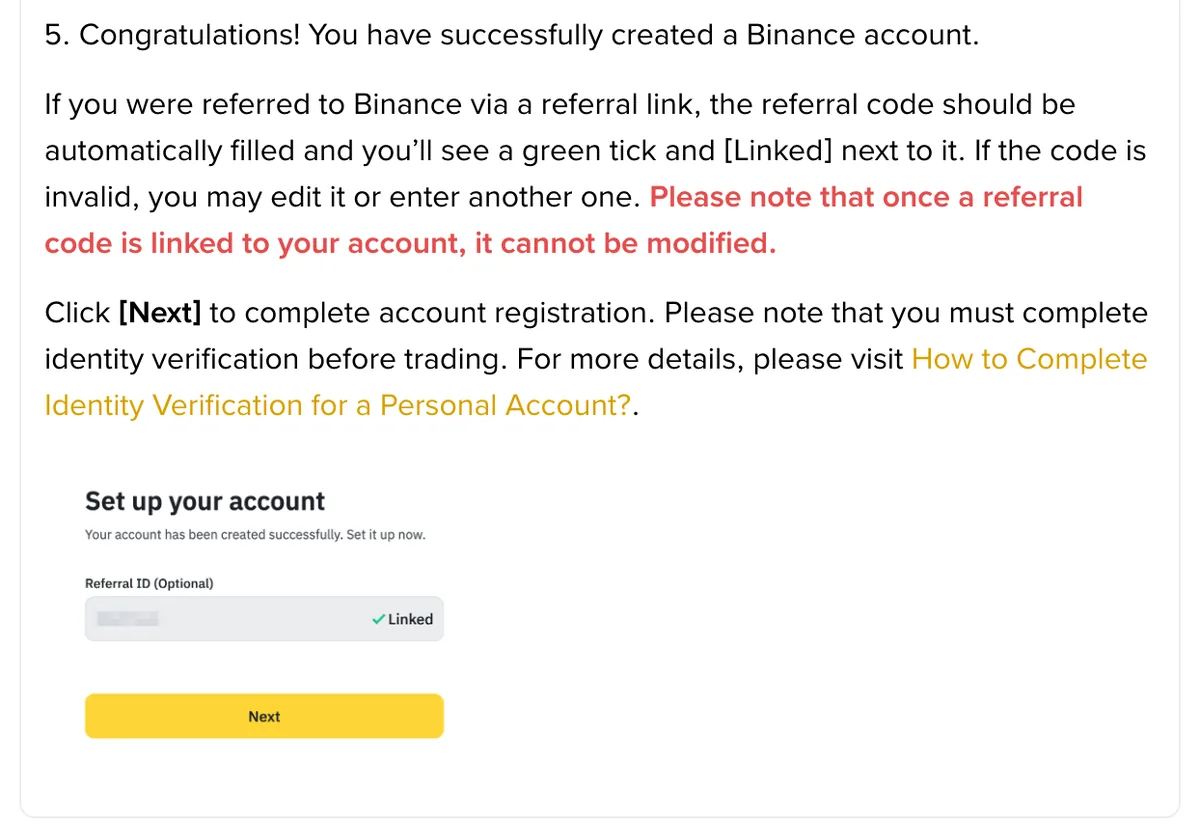
What you see falls into one of three cases:
- Code filled in, green tick, Linked. If this is the referrer you meant, click Next.
- Field empty. You did not come through a referral link, or the link did not carry the code. Type a code if you have one; otherwise click Next (or Skip in the app).
- Code typed in, no tick, no Linked. See the branch below.
B-04On screenI entered a referral code but Linked does not appear
Valid shows the tick and Linked; invalid can be edited or replaced. Do not click Next and hope. General advice, not Binance steps: compare the code character by character (O and 0, I and 1 are easy to swap) and delete spaces around a pasted code; reopen the sign-up page from the referral link so the code fills itself; if it still fails, ask the referrer for a new code or link.
Already clicked Next without a linked code? Do not deposit or trade. Read the 30-day conditions below first.
Referral Lite or Referral Pro: one mode per new user
Binance’s Introduction to the Binance Referral Program describes two modes. In Referral Lite, the referrer gets one-time vouchers when the new user completes set tasks. In Referral Pro, the referrer earns a commission from the new user’s trading fees, and the Pro FAQ says the new user receives a rebate if the referrer chooses to share it.
The introduction page states: “New users are entitled to one (1) referral mode only.” Registering through Lite rules out Pro. Ask which kind of link you were given before you register.
Where you live decides whether a referral counts at all. Binance’s Referral Program Additional Notes page requires completed identity verification and shuts out or limits: users from prohibited countries; Singapore residents, Binance FZE users and Binance Israel based users, on either side; Japan residents as referees since 1 August 2023; UK retail users, whose commissions were removed; users in Türkiye, where the retail programme ended; Hong Kong resident referees (neither side gets commissions); and, from 1 July 2026, users registered under EEA countries, in any capacity.
Signed up without a code: the 30-day exception
The Referral Pro FAQ lets a new user who forgot a Referral Pro code or link bind it afterwards, but only while six conditions all hold, among them being within 30 days of registration and having no deposit or trading activity on the account. All six, in the order you meet them, are on the fixbook page about a forgotten referral code.
The deposit condition is the one you control: one deposit ends the option. For Referral Lite, the Lite FAQ says “no corrective actions can be taken once the new user has registered.” Closing the account to re-register with another code does not help; the Pro FAQ says Binance can end referral commissions on the new account.
How to verify your Binance account
Binance’s verification page says all new users must complete Verified to access its products and services, including crypto deposits and trades. Your verification level also sets your trading limit.
To start on the website, hover over the profile icon, click Account, go to Identification and click Get Verified, or use Verify or Get verified on a homepage banner. In the app, tap Verify Now on the homepage, or the account center icon and then Unverified. App sign-up brings you here directly.
- Click Get Verified on the Identification page.
- Choose Residence, Document Issuing Country/Region and Document Type. Hypothetically, a country-A passport holder living in country B picks Residence B and issuing country A.
- Upload from this device, or scan the QR code to continue on your phone. Manual upload availability depends on the country.
- Upload the front and back of the ID card, then click Continue.
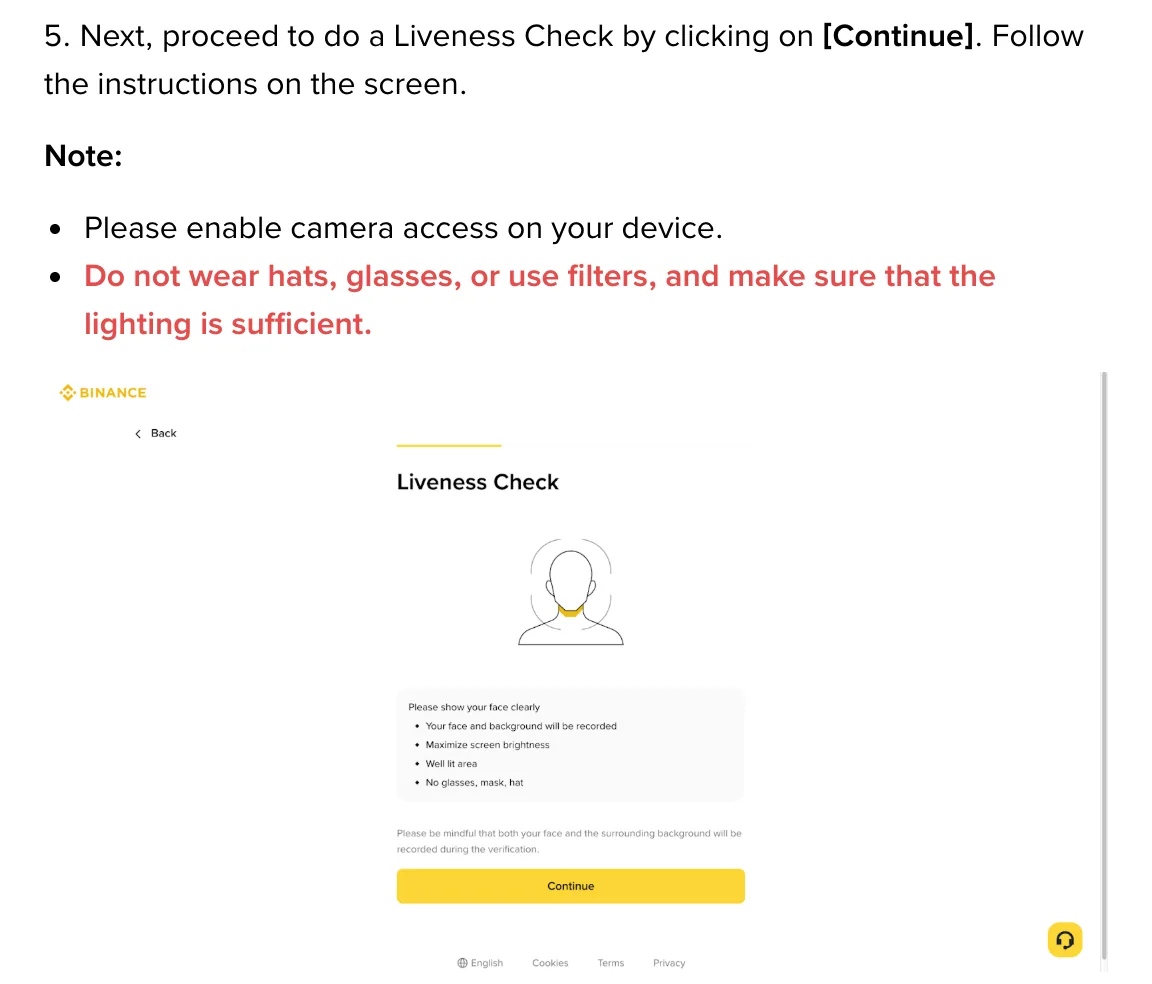
- Click Continue for the Liveness Check and follow the screen. Binance’s requirements: camera access enabled; no hats, glasses or filters; enough light.
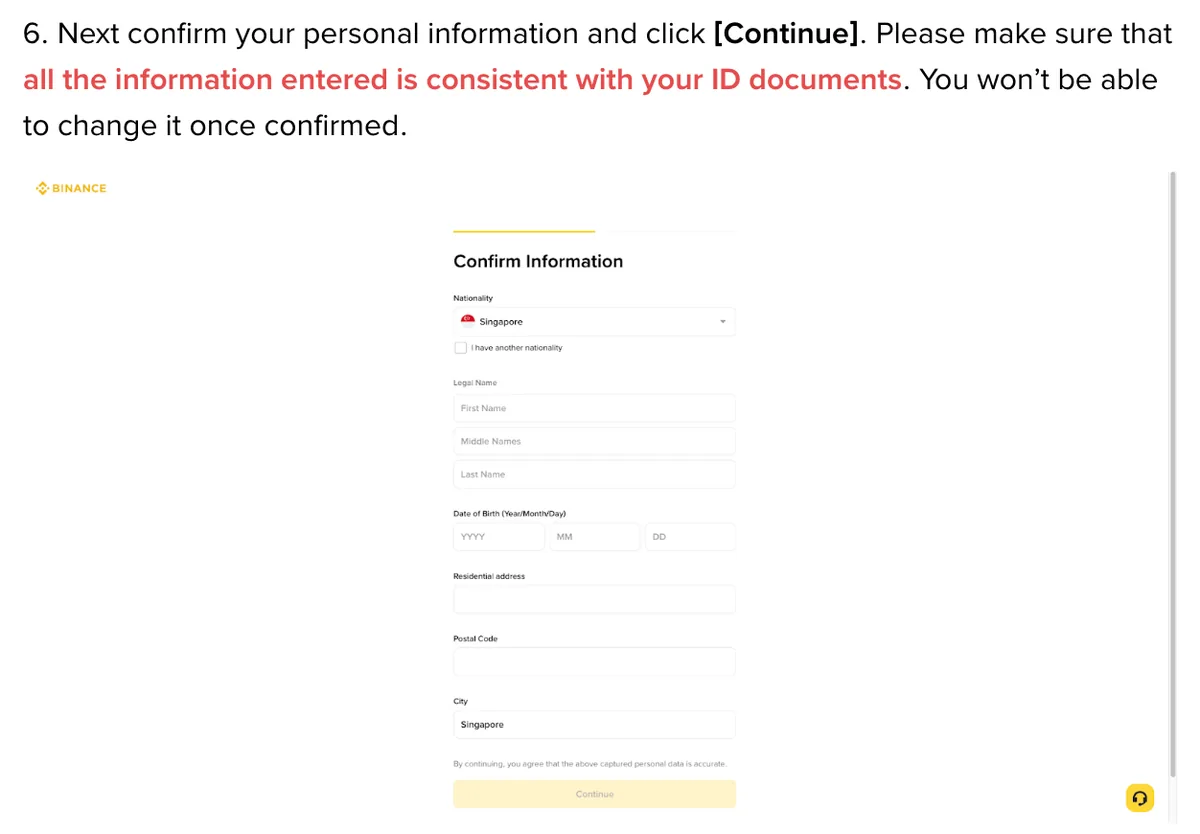
- Confirm your personal information and click Continue. “Please make sure that all the information entered is consistent with your ID documents. You won’t be able to change it once confirmed.”
- Wait for the review without refreshing the browser. Binance sends a notification once you are verified.
Step 6 is the third choice that cannot be undone. Check the spelling of your name, your date of birth and the document number against the document before you click Continue.
The app adds a Continue after the three choices and a choice of submission method, and asks you to centre your face in the frame, fully visible, eyes open. Do not refresh or quit the app while it runs.
B-05On screenThe face check fails again and again
Check Binance’s requirements one at a time: camera access allowed (re-allow it in browser settings if you refused the prompt); hat, glasses and filters off; enough light; in the app, face centred, fully visible, eyes open.
Do not let someone else do the check: Binance says you cannot substitute another person’s ID for yours. Specific failure messages are covered on the fixbook page about face verification that keeps failing.
How long Binance verification takes
Binance’s FAQ: “Submitted documents are usually reviewed within 48 hours. However, it may take longer in some particular cases.” Within 48 hours, wait and do not resubmit.
B-06On screenMore than 48 hours and it still says under review
What to check, and where to ask, is in the review section of the face verification guide; ignore anyone who offers to speed up the review.
Confirmed a wrong detail? Update Identity
Confirmed details change only through Binance’s Update Identity flow. The verification page lists the accepted reasons: expired document; changed name, ID number or nationality; documents for a specific fiat channel; a name in a system-recognizable language (for example, a local-language ID card replaced by an English-language passport); or Binance Card requirements.
On the website, click Update Identity on the Identification page. In the app, Binance’s page How to Update My Verified Identity Information gives: the home page icon, >, Verifications, Update Identity. Then select the reason, issuing country and document type.
That page warns that once you declare an update, the account “will be restricted to ‘Withdrawal Only’ mode until all of your new information has been submitted and verified”, so pick a time when you do not need to trade. If your reason is not in the drop-down list, it says to consult Binance’s customer service team.
Which security settings to add first
Both registration pages recommend enabling at least one two-factor authentication (2FA) method. Binance’s page on 2FA verification scenarios lists four: Passkeys, Email, Authenticator App and Phone Number (SMS or call).
To add a passkey on the website: Profile, Account, Security, Manage next to Passkeys (Biometrics), Add Passkey. In the app: Account Center, the profile section, Security, Passkeys (Biometrics), Add Passkey.
This fixbook recommends a passkey first, since Binance calls passkeys faster and more secure than a password alone. On the website, save it to Google Password Manager, which Binance marks as recommended because it syncs with your Google account; a Chrome-profile passkey “will only be saved on this device”. Then an authenticator app, which does not depend on signal or SMS coverage. SMS last, as a backup.
Leave the Must verify using passkey for important scenarios toggle off until a second method is in place. Binance’s page says that once it is on, “you won’t be able to log in to your Binance account if you lose access to your passkeys”, and that it should be turned off before changing phones, logging in to a new iCloud account, changing passkey settings on your phone, or reinstalling the app.
B-07On screen2FA Verification Strategy opens a pop-up with extra steps
Binance’s 2FA scenarios page sets two conditions for choosing methods per scenario (Login, Assets, Account Settings, Security Management): completed identity verification, and 100 USDT or more in assets. A new account with no assets does not qualify yet. That does not block adding a passkey; Binance’s passkey steps do not list these conditions.
The first check once you are verified and secured
Open Security, click Manage next to Passkeys (Biometrics), and confirm the passkey you added is listed; set up the authenticator app before you consider the must-verify toggle. If your referral field did not show Linked and the account is under 30 days old, make no deposit or trade until you have checked the 30-day conditions.
Questions people ask
Do I need ID to open a Binance account?
Not to create the account. Binance's registration pages only ask for an email address or phone number, or an Apple, Google or Telegram account. You need a government-issued ID for identity verification, which Binance requires before you can deposit or trade. The app version of the verification page says most users can choose a passport, ID card or driver's license, depending on the issuing country.
Can I use Binance without verification?
Not for deposits or trading. Binance's identity verification page says all new users must complete the Verified level to access Binance products and services, including crypto deposits and trades, and the registration page says you must complete identity verification before trading.
How long does Binance verification take?
Binance's verification page gives 48 hours as its usual review time for submitted documents and says some cases take longer. Do not refresh the browser or quit the app while the process is running. Binance sends a notification once the application is verified.
Can I add a referral code after signing up?
For a Referral Pro code, only within 30 days of registration and only if six conditions all hold, including no deposit or trading activity on the account. A Referral Lite referral cannot be fixed after registration. Once a referral relationship exists, it cannot be changed or removed.
Can I have two Binance accounts?
Not two personal accounts. The Binance Terms of Use list having no existing Binance account as an eligibility condition. Binance's verification page says that if you already have a verified personal account, you can create a separate entity account or use sub-accounts, up to five under your personal account.
Filed under these lines
T-1Sign-upT-3Identity verificationT-6Referral link