What you seeI want to close my Binance account and sign up again with a different referral code
Closing a Binance account to start over: a new referrer earns nothing from it
No. Binance’s referral FAQ asks this exact question, whether you can close an account and register a new one with a new referral code, and the answer it gives is “No.” The closure page spells out the cost before its first step: if the new account has a different referral relationship from the old one, you lose eligibility for referral rewards and for activities and rewards; identity verification on the new account may be blocked for 30 days or longer; and the old account cannot be brought back.
If what you actually want is a referrer on your account and the fee discount that comes with it, Binance has separate routes for that: binding within 30 days of sign-up, the Recall Program for returning users, and a rebind application. All three require that the account has no referrer yet. The conditions are in adding a referral code to an existing account. If you are done with this account for other reasons, decide between disabling and closing first, then clear your assets and follow the closure steps.
Disable or close: one can be undone, the other can’t
Both buttons sit in the same place. Go to Security, then Manage Account in the app or Account Management on the website. The names look alike, but they do different jobs.
Disable Account. Binance’s disable guide describes it as a way to protect your funds when you notice suspicious activity. You can come back from it. Log in, choose Unlock in the pop-up and complete the security verification. Binance then asks you to allow up to 48 hours before withdrawals and P2P are available again.
Close Account. This is you asking Binance to end the account. Clause 24.1 of the English Terms of Use, effective 21 July 2026, says you can close it at any time, free of charge, once anything you owe Binance is paid. There is no way back. The closure page says the account cannot be restored or accessed afterwards. To use Binance again you would need a new account.
To disable on the website, open Account, then Security, scroll to Account Management and click Disable. In the app the path is Account Info, Security, Manage Account, Disable Account. Either way, read the notes, tap Disable Account once more and complete the verification.
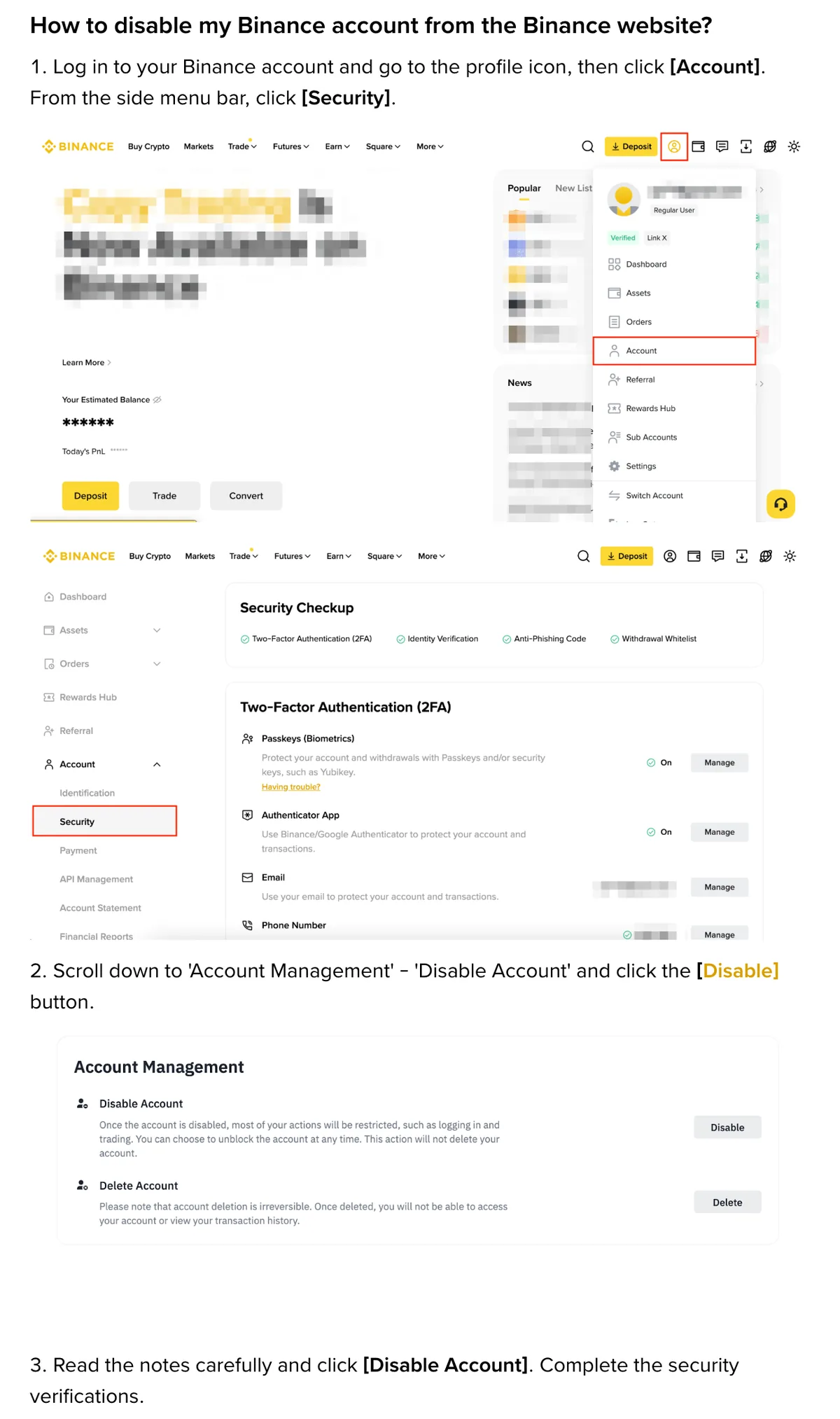
Use Disable if you only want the account locked, for example because you think someone else has logged in. If you are not sure you want to close it, disable it first. Both stop the account. A disabled account still has an unlock route; a closed one does not.
What has to be cleared before the account will close
The sources used in this guide, all checked in October 2026:
- the closure checklist and steps: How to Close My Binance Account? (updated 3 September 2026);
- disabling: How to Disable My Binance Account;
- referral relationships: Frequently Asked Questions on Binance Referral Pro Mode (updated 5 August 2026).
After step 6, the closure page lists situations that may stop the account from closing. Go through them one by one, using the current closure screen if its balance or order checks have changed:
- Balance above 5 USD. Withdraw the funds.
- Open Loan orders. Close them.
- A P2P order in the last 48 hours. Wait for it to complete.
- Earn subscriptions. Cancel them and withdraw the funds.
- Margin liabilities. Pay them off.
- Assets in the Futures account. Move them all to Spot or Funding.
- Active sub-accounts. Close those first.
- An active Web3 wallet. Convert it to a private key wallet.
The 5 USD figure is the line that can block closure. It is not an amount you can safely leave behind. Step 6 tells you to move any remaining assets to another account first. Otherwise they are lost and cannot be recovered.
Clause 24.1 of those Terms of Use adds cases where closure may not go through. They are pending transactions or unresolved claims, money you owe Binance, and an account that is frozen, held, restricted or reserved. If your account is restricted right now, follow the restriction notice or contact Customer Support to find out what must be resolved before you can close it. A frozen or locked account covers the different kinds of restriction.
Download your transaction history now if you want to keep it. The closure page links a tool for this and says to use it before closing, because the account cannot be accessed afterwards.
B-01On screenWhen I click Close Account, it says I still have assets or orders to deal with
One item on the list above is still open. Match the message to the list and go to that part of the account. For Earn, cancel the subscription and withdraw. For Margin, repay. For Futures, move to Spot or Funding. For sub-accounts, close them.
Two cases can’t be rushed. A P2P order less than 48 hours old has to finish first. A frozen or restricted account may not close at all under clause 24.1. Follow the account notice or ask Customer Support what needs to be resolved. Once that is cleared, go back to Security and start again from Close Account.
How to close a Binance account in the app or on the website
In the app:
- Log in, open Account Center and tap the profile section at the top.
- Tap Security and scroll down to Manage Account.
- Tap Close Account.
- Pick a reason for closing.
- Read the terms and tap Continue.
- If assets are still in the account, tap Cancel and move them first. If everything has been moved, tick the box and tap Close Account.
- Complete the security verification.
- The account is closed.
On the website the steps are the same, except in these places:
- Steps 1 to 3: hover over the Profile icon, click Account, click Security on the left, scroll to Account Management and click Close next to Close Account.
- Step 4 ends with Continue. In step 5 the button is Accept & Continue.
- Step 6: the way out to move remaining assets is Back, not Cancel.
Ticking the box in step 6 and passing verification closes the account, and the closure page says that cannot be reversed. Before you tick it, check that every asset has left the account.
Closing does not wipe your data on Binance’s side straight away. The closure page says some personal data may be kept to meet legal obligations, such as anti-money laundering laws, or to deal with disputes or claims. It is deleted once the required retention period is over.
Signing up again with the same identity: what goes wrong
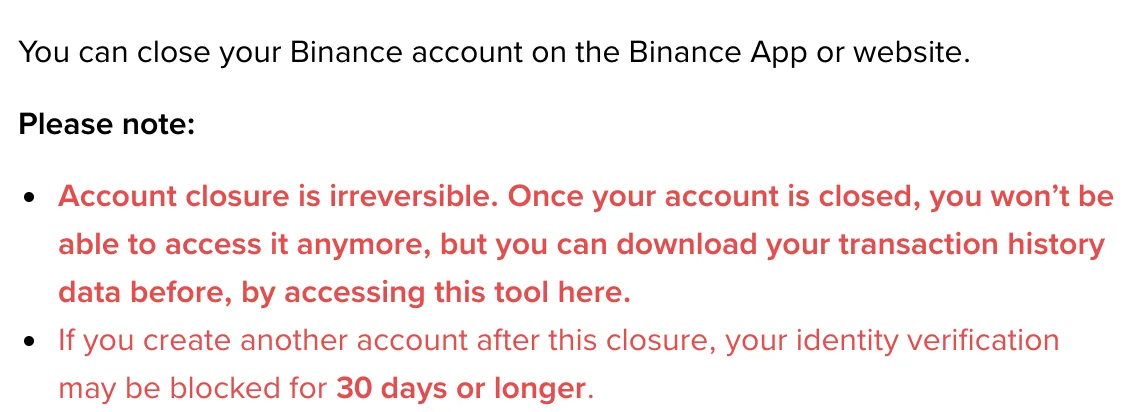
Identity verification may be blocked for 30 days or longer
The closure page says: “If you create another account after this closure, your identity verification may be blocked for 30 days or longer.” It says may, so a block is not certain. If you are blocked, it also does not promise the block lifts on day 30.
This matters more than it sounds. Binance’s identity verification page says every new user must complete standard verification before using Binance products and services, including deposits and trading. Put the two pages together. While verification on the new account is blocked, you may not be able to deposit or trade at all.
B-02On screenI closed my old account, signed up again, and can't submit identity verification
The closure page says only one thing about this: after a closure, verification on a new account may be blocked for 30 days or longer. Check the restriction message before retrying:
- If the message gives a retry date, follow it. The FAQ does not give a date on which your account is guaranteed to be ready for verification.
- Use only your own document. The verification page says you cannot substitute another person’s ID for your own.
If you cannot submit and the page gives no reason or retry date, contact Customer Support through Binance’s official site.
The new referrer earns nothing, and you lose your rewards eligibility
Question 7 of the Referral Pro FAQ deals with this plan directly. If the system detects that an account was closed to open a new one for referral benefits, Binance reserves the right to end all referral commissions from the new account.
Question 8 explains how it is detected. Your identity details (KYC) are the same on both accounts. When Binance finds a closed account and a new account with a different referral relationship under the same identity, commissions from you to the new referrer stop. You are also not eligible for rebates, and the rebate is the fee discount you wanted from switching referrer. Closing the old account does not change your identity, so there is no way around this check.
Where you live can rule out referral rewards anyway, whether or not you switch accounts. Binance’s referral programme terms exclude Singapore residents and Binance Israel based users. Residents of Japan cannot be referees. UK retail users get no commission, the retail programme has ended in Türkiye, and when the referee lives in Hong Kong, neither side is paid. From 1 July 2026, users registered under EEA countries cannot take part. The list changes, so check the current version of the terms.
B-03On screenThe new referrer says their dashboard shows: This user has a previous account with a different referral relationship
That is the message from question 8 of the Referral Pro FAQ, and it ends with “hence you are not eligible for subsequent referral commission.” Binance matched your identity details to an earlier account. Both sides lose. The referrer’s commission ends, and you get no rebate.
The same answer says that once a referral relationship is established, it cannot be changed. Don’t close this account as well to try again. Any new account would carry the same identity details.
No code at sign-up, planning to add one within 30 days? The 180-day rule stops it
Question 4 of the Referral Pro FAQ lets someone who forgot the code at sign-up bind it afterwards. All six conditions must be met, and the first is: “The user’s KYC information has not been used on another account within the past 180 days.” Your document was just on the old account, so the new one fails this condition, even if it meets the other five.
Why Binance’s 30-day referral window does not solve this
This is a worked example that uses only the two figures from the official pages. The FAQ does not say when “used on another account” starts counting. The example assumes it runs from the day the old account closes, the last day your document was attached to another account.
Say you close the old account today. The same day, you sign up again with the same document and leave the referral field empty, planning to add a code later:
- Day 0. The old account closes and the new one is created. Your document was in use on the old account up to today.
- Days 1 to 30. The new account is inside the 30-day binding window. But identity verification may be blocked for “30 days or longer” over the same stretch. The “not used on another account within the past 180 days” condition is not met either.
- Day 31 onwards. The 30-day window has closed. Even if the verification block lifts now, all you have back is the ability to verify. This 30-day binding option is no longer available.
- Around day 180. This is the earliest the document condition could be met, 150 days (180 − 30) after the binding window shut.
The whole 30-day window falls inside the period when the document condition fails and verification may be blocked. Entering a new code at sign-up runs into question 8. Leaving it blank and adding one later runs into this timeline. Either way, you end up with an account that earns no referral reward and may not pass verification in its first month.
Problems that closing a Binance account won’t solve
Closing makes sense in two situations. The first is when you are finished with Binance and every asset has already been moved out. The second is when you are worried about security and want the account gone rather than left open. In that case, go in two steps. Disable it now, and close it once your assets are safely out and you are sure you won’t need it. A disabled account has an unlock route, while the closure page says a closed one cannot be restored.
These goals are not served by closing, and closing makes them harder:
- Changing or adding a referrer. An existing referral can’t be changed. If there is none, use the routes in the second paragraph of this guide.
- Correcting your identity details. The identity verification page has an update process. Open Account, then Identification, and click Update Identity and choose a reason. The listed cases include an expired document, a change of name or ID number on the document, and a change of nationality. Closing and re-registering changes nothing here, and the new account may face a verification block first.
- A second account to keep money separate. Question 5 on the identity verification page says that if you already have a verified personal account, you can open an entity account or use sub-accounts under your personal account.
One thing to check before you press Close Account
Make sure your transaction history is saved on your own device. The closure page says the account cannot be accessed after it closes, and that the history has to be downloaded beforehand with the tool it links. Open the closure page, export your records with that tool and check the file is saved. Then go back to step 6 and tick the box.
Questions people ask
What is the difference between disabling and closing a Binance account?
Disabling protects your funds when you see suspicious activity, and it can be reversed: log in, choose Unlock in the pop-up and complete the security verification. After an unlock, withdrawals and P2P may be unavailable for up to 48 hours. Closing ends the account for good; Binance's closure page says it is irreversible. Both options are under Security, in Manage Account in the app and Account Management on the website.
Does Binance delete my personal data when I close the account?
Not straight away. The closure page says Binance may need to keep some personal data after closure to meet legal obligations, such as anti-money laundering laws, or to handle disputes or claims. The data is deleted once the required retention period ends.
Filed under these lines
T-9Closing and reopeningT-6Referral link