What you seeI submitted identity verification, then saw my name or country was wrong
Correcting your name or country on Binance: when Update Identity applies
Which field is wrong, and does your ID show the right value? That answer picks your route. Update Identity isn’t a typo-fixing tool. Binance lists seven reasons for using it, and every one involves a document or identity that has changed or needs replacing: a new name, a new nationality, an expired document, a changed ID number.
Your ID is fine and you simply mistyped a letter or picked the wrong option? That isn’t on the list. The update page says that if your reason isn’t in the drop-down, you should consult customer service. Either way, there’s no edit button on confirmed details, and once you declare an update the account drops to Withdrawal Only until the new information is verified.
Name doesn’t match your ID: which update reason applies
This guide follows two Binance help pages, both checked in October 2026: How to Complete Identity Verification for a Personal Account? and How to Update My Verified Identity Information?.
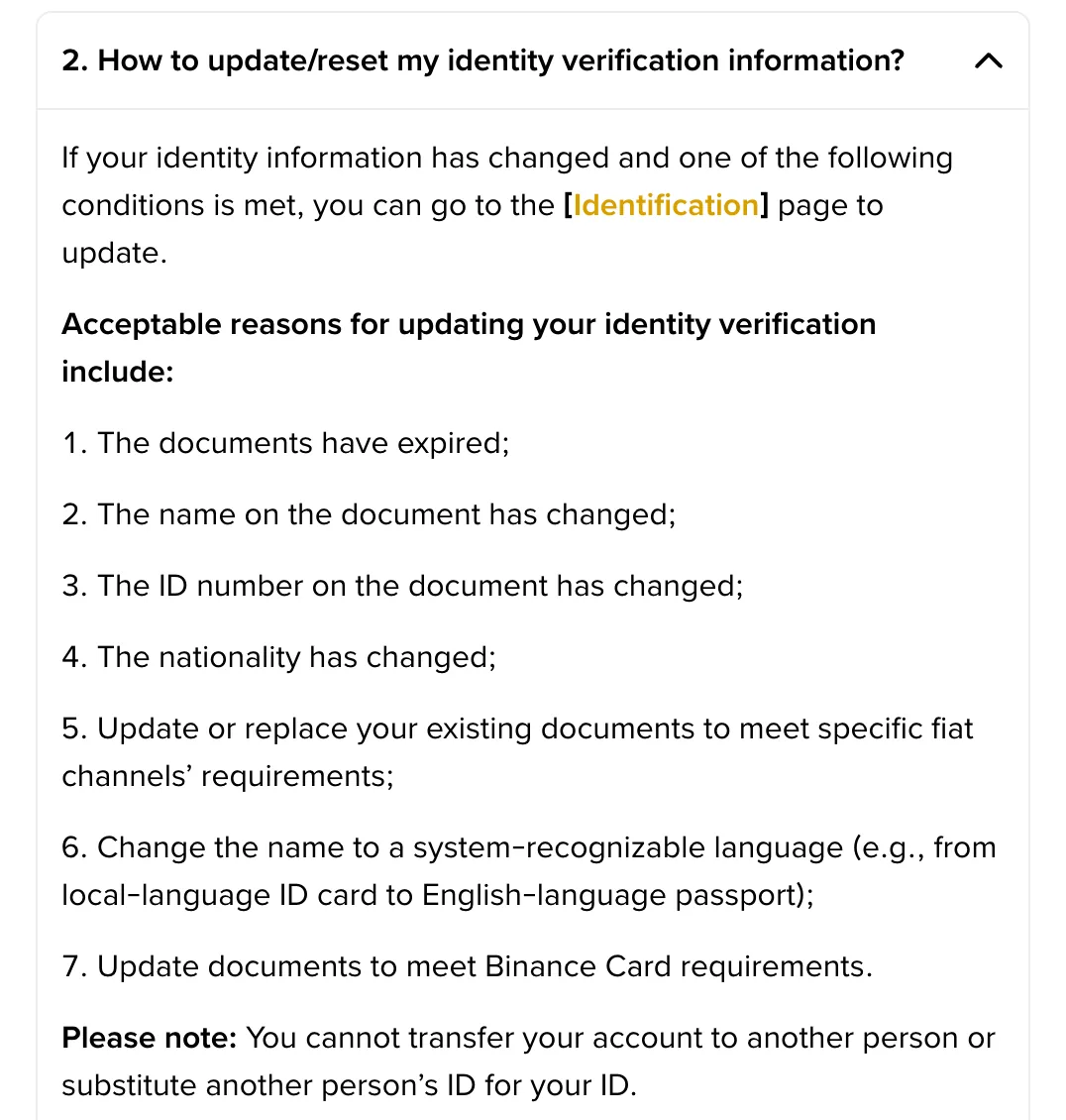
Question 2 in the first page’s FAQ lists the seven reasons. Two of them concern your name. The name on the document has changed means your ID now carries a new name and your account still shows the old one. Change the name to a system-recognizable language has Binance’s own example beside it: moving from a local-language ID card to an English-language passport.
If one of those two fits, the website route is:
- Open the Identification page and click Update Identity.
- Select the reason for the update and click Continue.
- Select the document’s issuing country or region and the document type, then click Continue. Use the document showing your new name. Binance notes that manual upload depends on your country.
- Follow the on-screen instructions and wait. You’ll get an email when the system has processed the request, and the update page says you can then submit your verification again.
In the app, the update page gives this path: the home page icon, > for your account information, Verifications, then Update Identity.
Has your name never changed, and you just entered it differently from your ID? Neither reason fits. Skip to the last section.
B-01On screenI clicked Update Identity, but I can't get any further
Binance’s update page ends on this case: if you can’t proceed, reach out to Binance Support.
Note the step you’re stuck on and copy the exact message from the screen before you open the chat. Support can then match it to your account’s state.
Wrong country or region: nationality and residence aren’t the same
Verification asks for two location choices at its second step: Residence and Document Issuing Country/Region. Only one of the seven reasons touches country: The nationality has changed. If you now hold a new nationality and want to use that document, follow the steps above and choose the new issuing country at step 3.
Residence chosen incorrectly? None of the seven reasons says that. Open the flow only if the drop-down offers a reason that truly describes your case. If it doesn’t, the page’s instruction is “please consult with our customer service team”.
One exception sits at the top of the update page. Users with a Certificate of Residence (COR) in these 15 countries get a separate Click here to reset KYC link: UAE, Australia, Bahrain, Brazil, Cyprus, India, Japan, Kuwait, Kazakhstan, Oman, Qatar, Russia, Saudi Arabia, Türkiye and South Africa. Everyone else uses the standard flow.
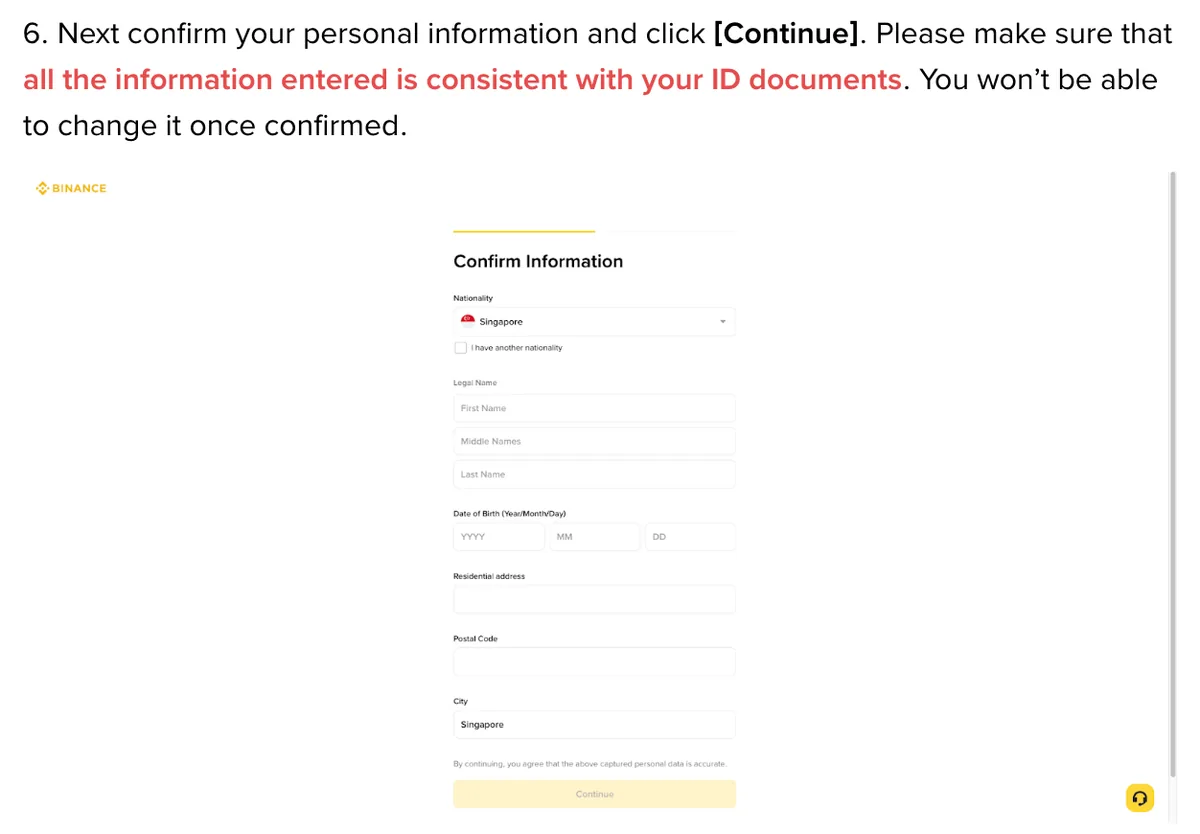
Pick the place you actually live. Residence isn’t a setting to choose for convenience, and the confirmation screen says that by continuing, you agree the captured personal data is accurate.
Expired ID, new ID number, or a different document type
This is where the list is most generous. The documents have expired and The ID number on the document has changed are both named outright. Two more cover updating or replacing documents to meet a specific fiat channel’s requirements or Binance Card requirements.
For any of these, use the same flow and choose the document you’re submitting now at step 3. If your ID is close to expiry, you can choose a quiet week for the update. The next section explains why that matters.
Already verified and just prefer a different document, with no fiat channel or Binance Card reason behind it? None of the four fits, so this also goes to customer service.
The verification page adds a line under the list: you can’t transfer your account to another person or substitute another person’s ID for yours. Whatever you submit has to be your own document.
Before you click Update Identity: clear your trading plans
The restriction starts early. Binance’s wording is “upon declaring to update your KYC materials”, so it applies from the moment you declare the update, not when the new documents enter review. It lasts “until all of your new information has been submitted and verified”.
The verification page describes this kind of limited state as fund withdrawal, order cancelation, position close and redemption. So you could still exit a position, but you couldn’t open a new order. Have an order to place or a position to adjust soon? Deal with that first. Non-urgent reasons, such as a document expiring soon, don’t need to land in a busy trading week.
Withdrawal Only is one of several restricted states on Binance, each lifted in a different way. If you’re unsure which one you’re in, compare the wording on your screen in account locked, disabled or withdrawals suspended.
B-02On screenI started an update and now I can't trade
Check the restriction message first. If it says Withdrawal Only after you declared an identity update, Binance’s update page says that restriction lasts until the new information has been submitted and verified. If the screen also mentions a security review, disabled account or suspended withdrawals, report that exact message to Support; starting an identity update doesn’t rule out a separate restriction.
Two things to do now: go back to Identification and check whether anything is still missing, then wait for the email saying the review is complete. Everything submitted but the process isn’t moving? Contact Binance Support, as the update page advises.
Just a typo: one wrong letter or digit
Your ID is correct, but you mistyped your name or document number on the confirmation screen at step 6. This case is stuck on both sides. Step 6 requires your details to be consistent with your ID and says you can’t change them once confirmed, while the seven reasons never mention a mistake during verification.
B-03On screenMy situation isn't in the update reason drop-down
The update page gives one destination for this: customer service. Tell them three things: which field is wrong, what the account shows now, and what your ID says.
Don’t pick a nearby reason just to get through. Choosing “name has changed” when it hasn’t means your declared reason won’t match your document, and the account still goes into Withdrawal Only.
So for a typo, or for a residence you chose wrongly, ask through the live chat on Binance’s official site before you declare anything. Starting the flow with a poor-fit reason costs you trading access and may not fix the field. If the drop-down has a reason that matches your case exactly, you can go straight in.
Thinking of closing the account and registering again with cleaner details? Read closing and reopening a Binance account first.
Short answers
What can I still do on Binance during an identity update?
Binance's update page says the account is restricted to Withdrawal Only mode until all your new information has been submitted and verified. Its verification page describes Withdraw Only as limited to fund withdrawal, order cancelation, position close and redemption. Opening a new order isn't on that list.
Filed under these lines
T-3Identity verificationT-8Account restrictions